
We would like to share with you our experiences in working towards achieving an independent deployment process for our frontend projects at Allegro. In this article, we will take you through the entire journey of finding the right solution. We will describe our approaches and the challenges we encountered along the way. We will also describe the target solution in detail and share the numbers associated with it. Read on to discover how we transformed our deployment process and what impact it had on our developer experience.
Before we dive into the problem itself, we need to cover a few key aspects of our ecosystem’s architecture.
What does the frontend architecture at Allegro look like? #
In our organization, we have more than 120 development teams looking after specific parts of our platform’s frontend. This requires organizing the frontend architecture in such a way that teams can freely develop and deploy subsequent changes within their respective areas.
To make this possible, we implemented an internal framework called Opbox. We described the story behind its creation in our article Managing Frontend in the Microservices Architecture (it’s been over 10 years already! 😉).
Below, you will find a simplified diagram of our architecture. In this article, we will focus on opbox-web — the service responsible for rendering Allegro’s entire frontend. As you can see, it is the first service within the Opbox project to handle every HTTP request coming from users’ browsers and Allegro mobile apps (MBox). Crucially, it has numerous dependencies (components, plugins, services) defined in the registry that are responsible for rendering and managing all of Allegro’s UI elements. The scale is massive and constantly growing — currently we have 1200+ projects registered as opbox-web dependencies, each of them being an independent npm package.
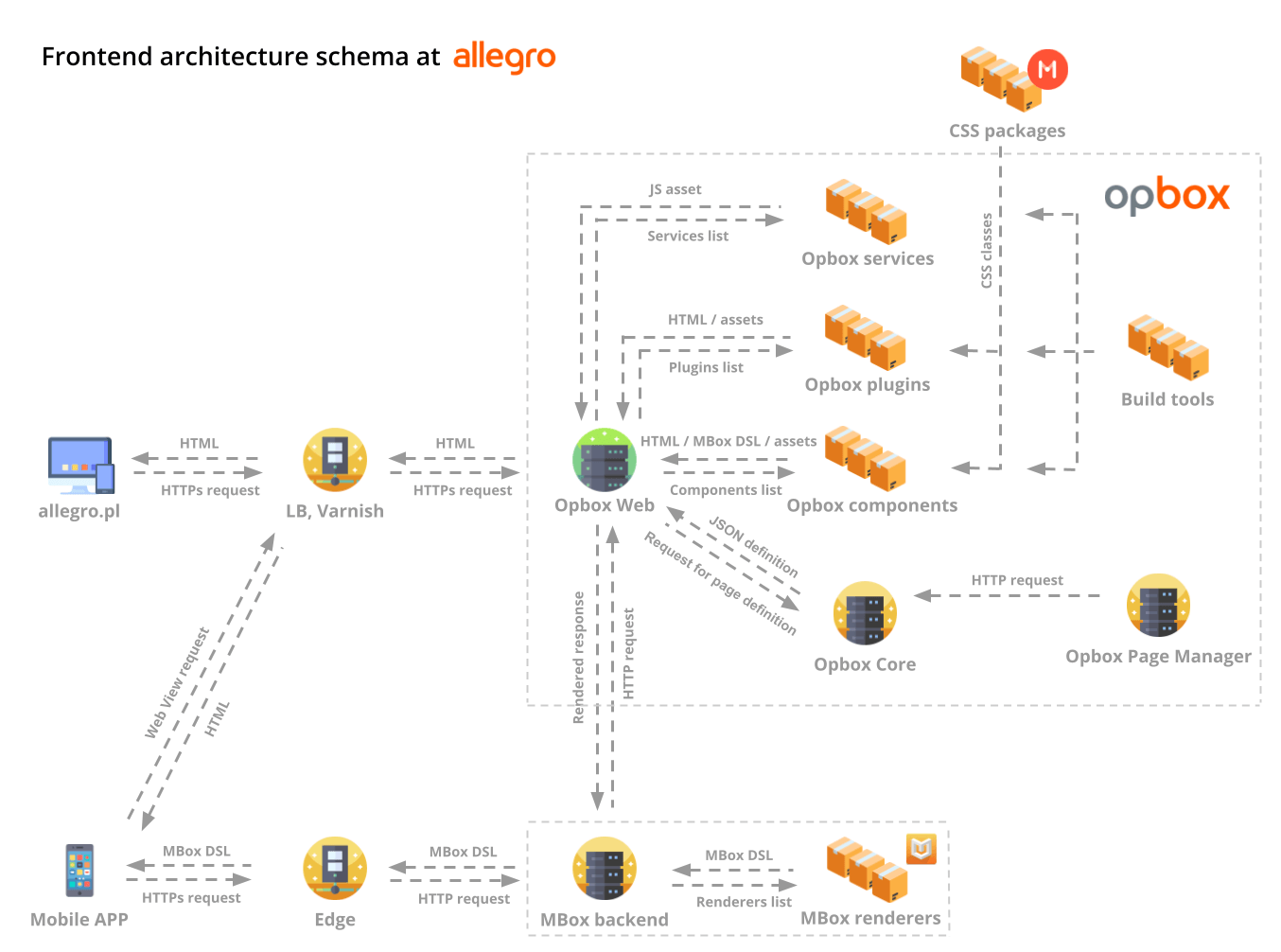
Before we move on, let’s clarify exactly what components, plugins, and services are — all of which are npm packages.
-
Opbox components – responsible for rendering and handling a specific interface fragment within the Allegro platform (e.g., page header, footer, offers list).
-
Opbox plugins – responsible for delivering raw JS scripts or rendering an interface fragment positioned at the top or bottom of the DOM tree (e.g., third-party tracking scripts, GDPR modal).
-
Opbox services – responsible for providing a script for communication between components on the client-side (e.g., a pub-sub mechanism to increment a counter when a user adds an item to the cart).
The Challenge to Address: The service deployment bottleneck #
Every day, each team develops their frontend projects with the goal of successively deploying them to subsequent environments, ultimately reaching production. Having all of them bundled as dependencies within a single service (opbox-web) enables the centralization of many operations. However, an architecture designed this way inherently introduces a deployment bottleneck.
Deployment of a service that has over 1200 different dependencies maintained by more than 120 development teams comes with many challenges. We used to manage releases using a method well-known in the IT world — release trains. These were performed manually by an Opbox engineer on duty, twice a day at scheduled times. However, this approach had several drawbacks, such as:
-
Gathering all authors of the changes — The deployment requires bringing together all contributors (or their designated backups) at the same time to confirm that the new component versions work properly during the release.
-
Error monitoring and tracking down owners — During application deployment, the Opbox engineer must monitor incoming errors and route them to the appropriate teams.
-
The need to revert a change — If an error is detected, the team must roll back the change. This blocks the deployment until the previous version of the dependency is restored in the registry. During this time, the other deployment participants have to wait, which ultimately extends the deployment time.
This form of daily deployments was a major pain point for both Opbox on-duty engineers and developers releasing changes in their own projects. Therefore, we decided to find a solution that would allow developers to seamlessly deliver their changes to production without needing to involve them in the opbox-web deployment process.
Attempt #1: FaaS components #
Our first approach to achieving independent deployments for components was using FaaS (Function-as-a-Service) — our internal implementation of dependency as serverless functions.
These functions accepted parameters and generated HTML code along with URLs to assets (JS / CSS). Components using FaaS were not permanently kept in the memory of the opbox-web service. Instead, they were invoked on demand via HTTP requests. This carried a major downside: Even though these HTTP requests were executed within the internal network in the same data center, the network communication overhead was highly significant and drastically impacted the overall page rendering performance. This was especially problematic for smaller components embedded on a single page multiple times, which generated a massive volume of network requests.
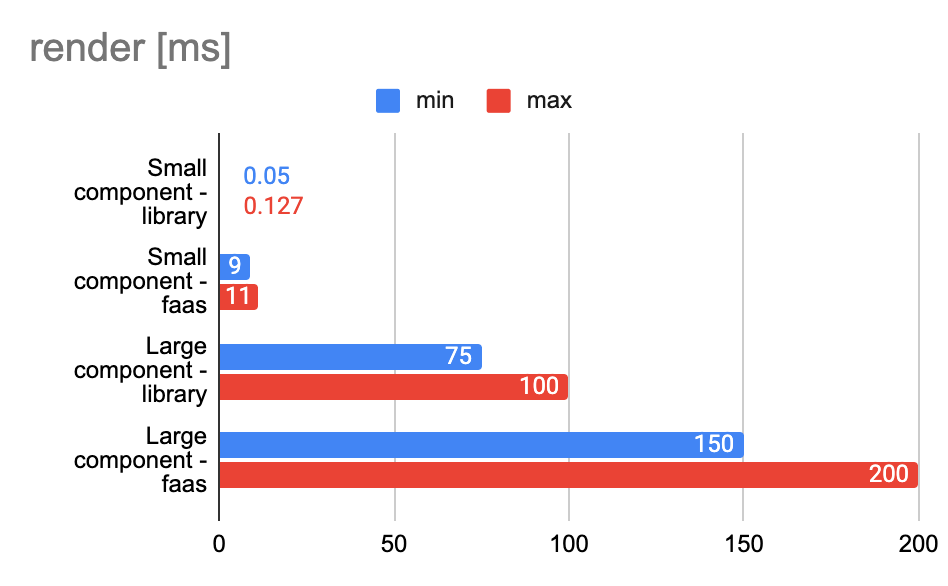
Since this solution couldn’t be applied to 100% of the dependencies, we were forced to look for an alternative. Maintaining two different solutions for independent deployments significantly increased architectural complexity and defeated the purpose, so we decided to close the functional components project. By the end of Q2 2024, we had migrated all components back to regular components.
Attempt #2: Independent deployments #
In this approach, we focused on evolving what had been working well for us so far. Opbox already allowed adding multiple versions of a single component to the registry. This was used to compare two versions of the same component for A/B testing, helping to determine which one better met user needs.
The selection of the component version to render a given part of the interface took place during page rendering, based on a parameter that determined whether a given user was assigned to the A/B experiment group or not. Consequently, by simply changing this parameter’s value in our admin panel, we could instantly switch the main version of the component.
Given that, we thought — why not base all deployments on a similar solution? This is how we decided to kick off the Opbox Independent Deployments project.
The idea was simple: to build a solution where developers adding a new version to the registry can enable it on any environment at any time. This means that every newly added version is disabled by default and stays unused until the owner explicitly enables it in the admin panel. Until then, traffic continues to be handled by the previous version of the component.
After a certain period, the old version can be permanently removed from the registry and will no longer be available for a quick rollback.
At the beginning of Q3 2024, we designed a solution that met the requirements and immediately started working on it.
Simplified architecture diagram of the new solution #
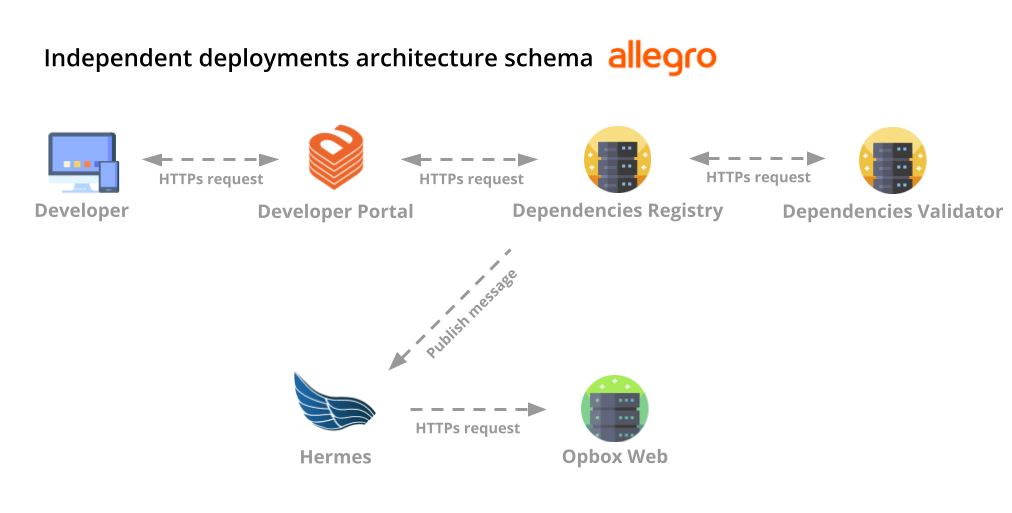
Independent deployments schema consists of several complementary services.
-
Developer Portal — This is our internal portal for developers, built on Backstage. It is a central place for managing every project in our organization. We implemented an interface specifically for managing opbox-web dependency versions within it, alongside dashboards for real-time component error monitoring.
-
Dependencies Registry — A service responsible for storing the current registry state of the opbox-web service. It contains information about enabled dependency versions across all environments, as well as a history of the changes and details regarding opbox-web deployments.
-
Dependencies Validator — A service responsible for validating a new dependency version that the developer wants to release. It performs this validation in real time and indicates whether the implementation meets the organization’s standards.
-
Hermes — An asynchronous message broker that mediates communication between the registry service and opbox-web. It notifies each opbox-web instance whenever specific dependencies are enabled or disabled in a given environment.
-
Opbox-web — A service responsible for rendering Allegro’s frontend, deployed across multiple environments and running on numerous Kubernetes clusters.
Deployment flow #
In the world of independent deployments, a developer looking to release a component change goes through several stages — starting with publishing the new version to Artifactory (Artifact repository manager), testing it across successive Allegro environments, and finally enabling it for 100% of users.
Publishing a new dependency version #
Once the developer completes the implementation phase and wants to proceed with releasing the component, they publish a new package to Artifactory. The process is executed via a GitHub Actions workflow. The developer can select one of the three package types:
-
snapshot (e.g. 1.0.0-snapshot.1) — the default publication type, used exclusively for testing purposes in the development environment. Expires after 30 days.
-
full version (e.g. 1.0.0) — A full version that is ready for production use. This version is automatically published once changes are merged into the main branch of the project.
-
beta (e.g. 1.0.0-beta.1) — This is an alternative variant of a stable project version. It is used when conducting A/B tests to compare which implementation provides a better user experience.
Once the new version is published, the developer can proceed to the next stage.
Dynamic installations in the development environment #
The newly published version can be quickly verified in any development environment. To do this, the developer navigates to the project page in Developer Portal and installs the version in their selected VTE (Virtual Test Environment — an internal Allegro testing environment assigned to a specific team or developer).
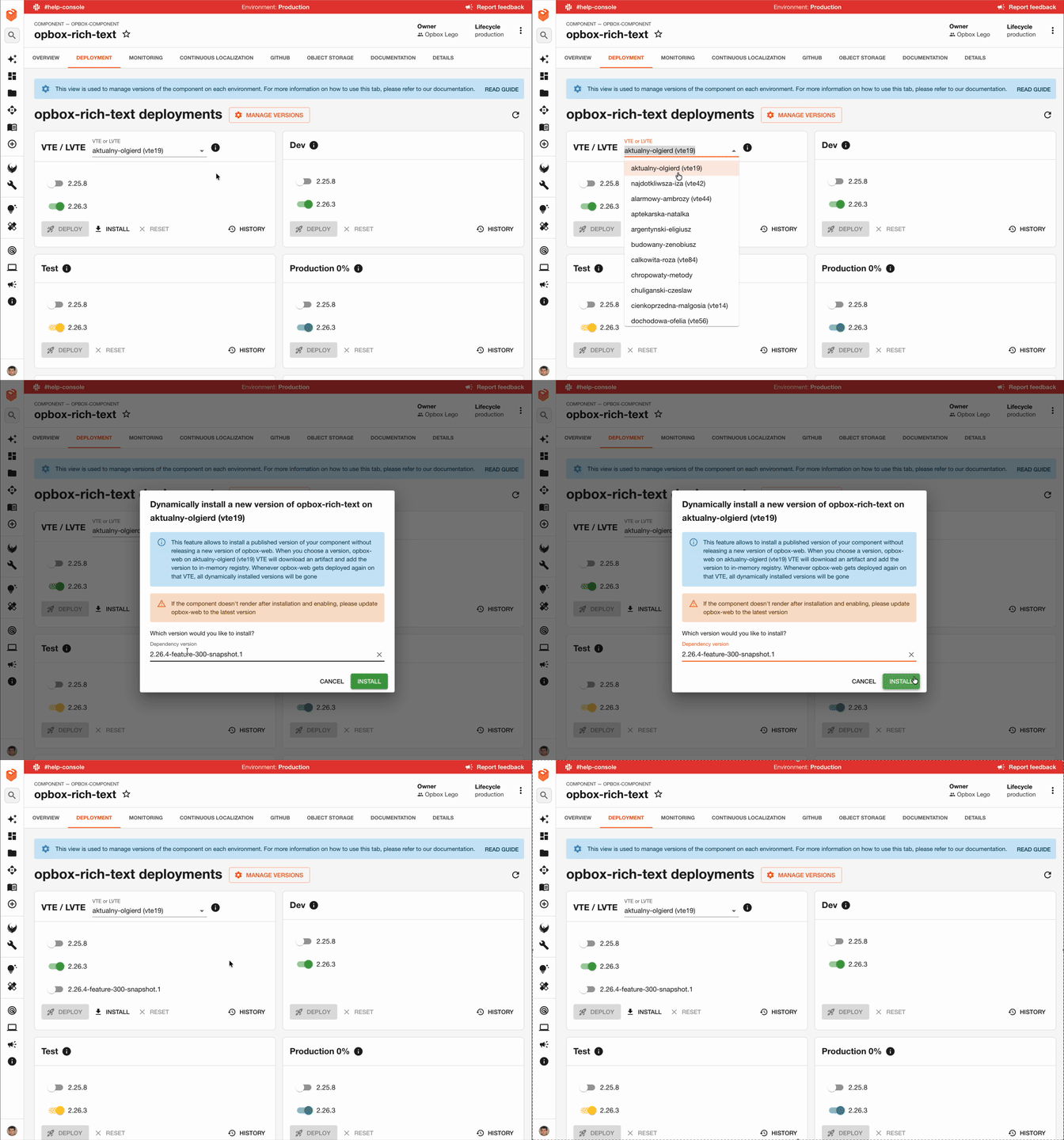
From a technical point of view, the Dependencies registry service communicates with Hermes at this stage. It publishes a message to a topic that every opbox-web instance listens to. If an instance detects that the installation applies to the specific environment it handles, it downloads the given dependency version from Artifactory and loads it into its memory. As a result, this version can be used in runtime immediately.
Once installed, the version simply needs to be enabled. It then goes live immediately in the development environment, allowing the developer to verify that everything works as expected.
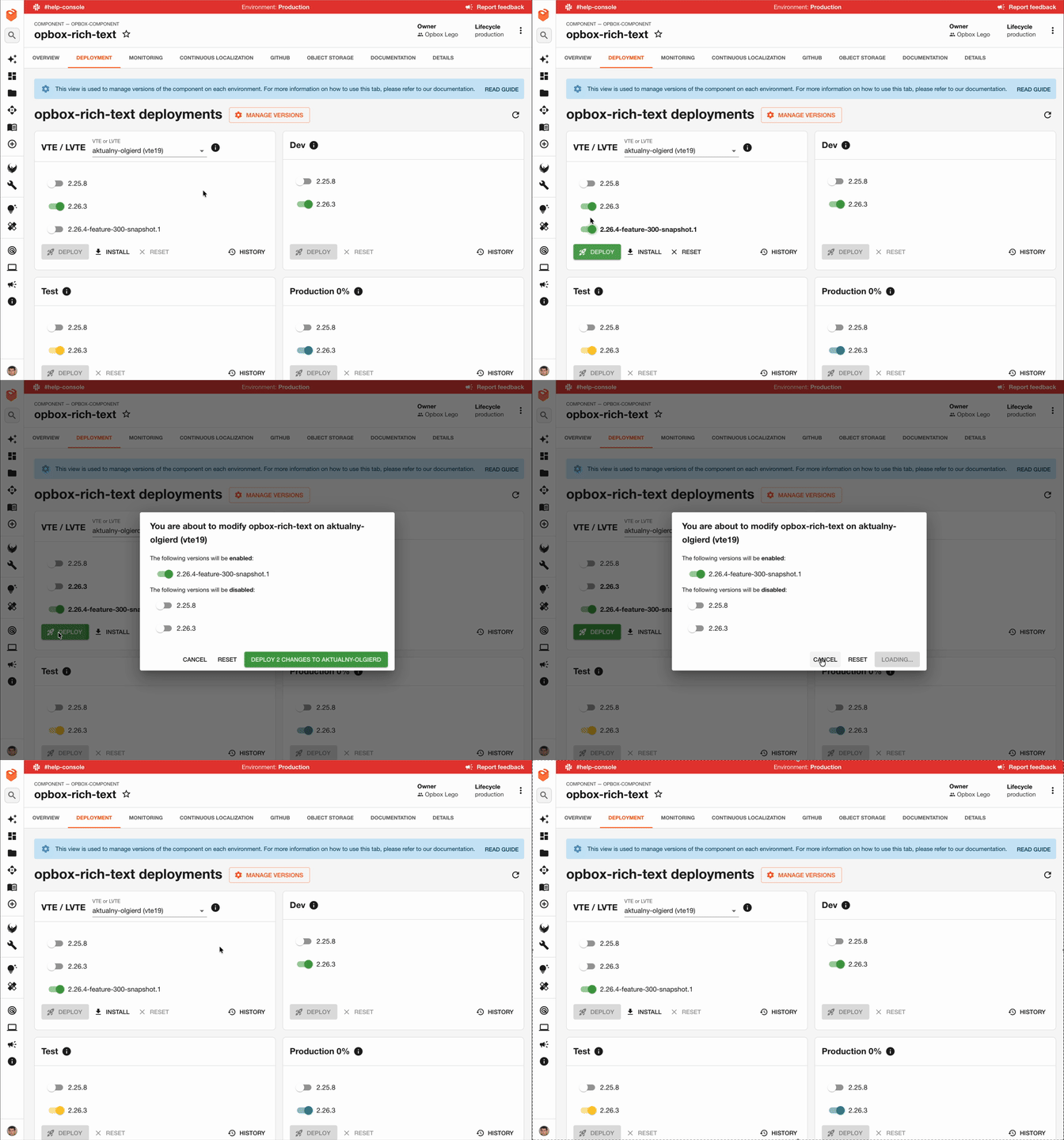
The Dependencies registry service communicates with Hermes once again. It publishes a message to the topic announcing the change in the active version. As a subscriber, opbox-web receives the new active version state from Hermes and adjusts accordingly, enabling the new version and disabling the old one. Consequently, from this moment on, every user visiting that specific development environment will see the rendering output from the new component version.
Fetching dependencies directly via the service instance reduces the time between adding a version and its appearance in the running application’s registry to just a few seconds. However, this approach has a downside — dynamically importing a new dependency into memory at runtime naturally impacts memory consumption. Based on our experience, there is no simple way to free up memory in Node.js once an imported dependency is no longer needed.
With platform stability as our top priority, we decided to apply this solution only to VTE environments, where a potential increase in memory usage is not a critical issue.
We also took advantage of the fact that each VTE environment has only one instance of the opbox-web service. This instance keeps the dynamically installed dependency in memory for its entire lifespan. Once the application restarts, the registry reverts to its initial state without these dependencies. This allowed us to avoid implementing startup-fetching logic for dynamic dependencies, keeping the project’s complexity down.
However, we don’t rule out evolving our production deployment process in this direction in the future. To do so, we will first need to solve the issue of releasing memory within the service, as well as the challenge of fetching dynamically installed dependencies during application startup.
Adding a new version to the registry #
Once the new version is verified and the developer wants to deploy it to production, they can proceed to the next step: adding the new version to the dependencies registry. This process is also carried out using Developer Portal.
When adding a new version to the registry, the new dependency is validated against our requirements — for instance, to ensure it has monitoring configured or that its implementation won’t negatively impact the performance of the opbox-web service.
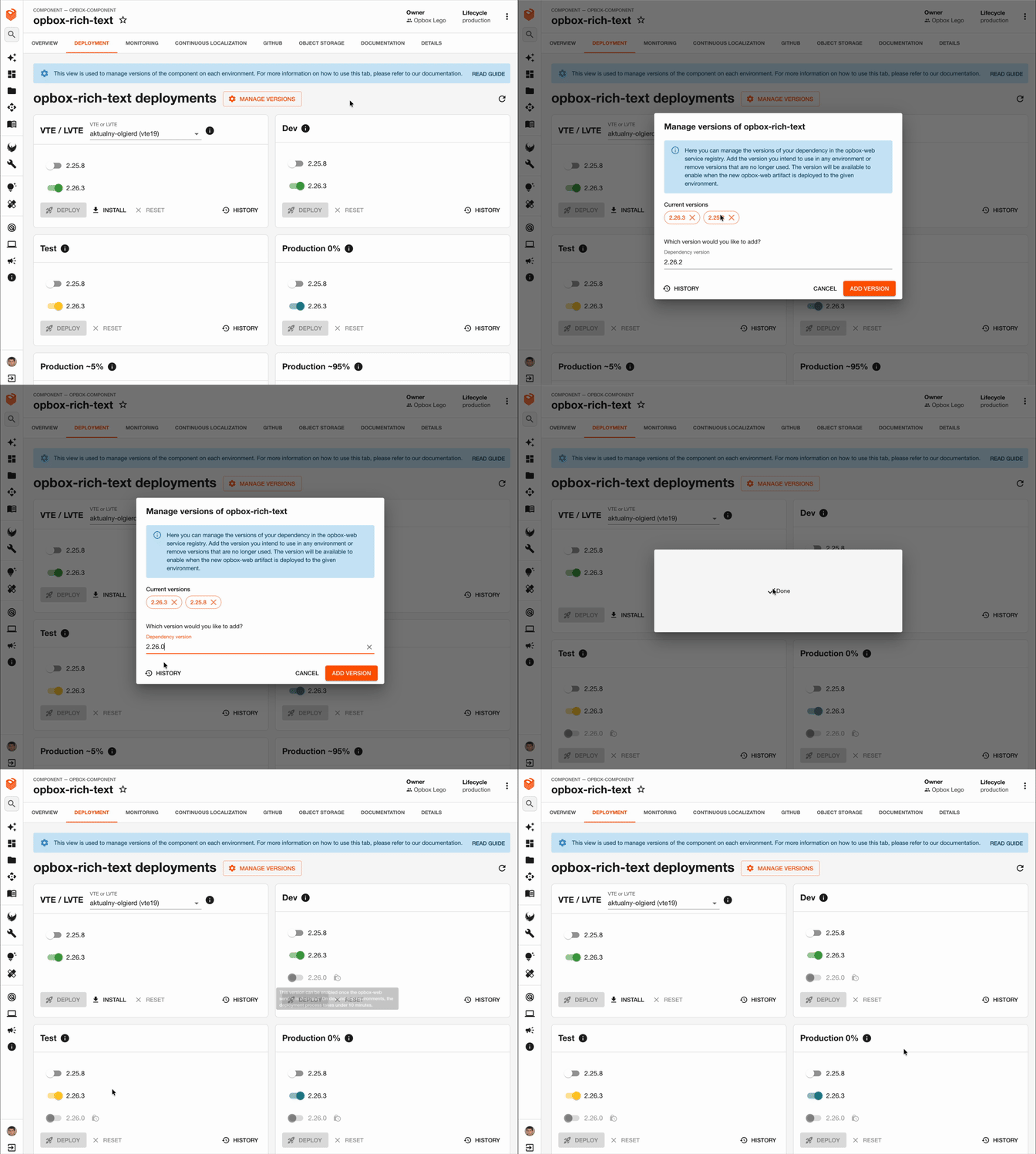
After a new version is added to the Dependency registry, the service sends an HTTP request to the GitHub API, triggering a workflow in the opbox-web repository. This builds a new service artifact and deploys it to the test environment (allegro.pl.allegrosandbox.pl). As a result, the version is ready to be enabled on this environment via Developer Portal within just a few minutes.
On production, the new version will be available to be enabled once the next opbox-web service deployment is completed. It runs automatically three times a day every business day. You can find more about this process in the “Automated deployments of the opbox-web service” section below.
Enable new version #
As previously mentioned, managing enabled versions is handled via Developer Portal. Once opbox-web is deployed to the next environment, the new version of dependency immediately becomes available for activation there.
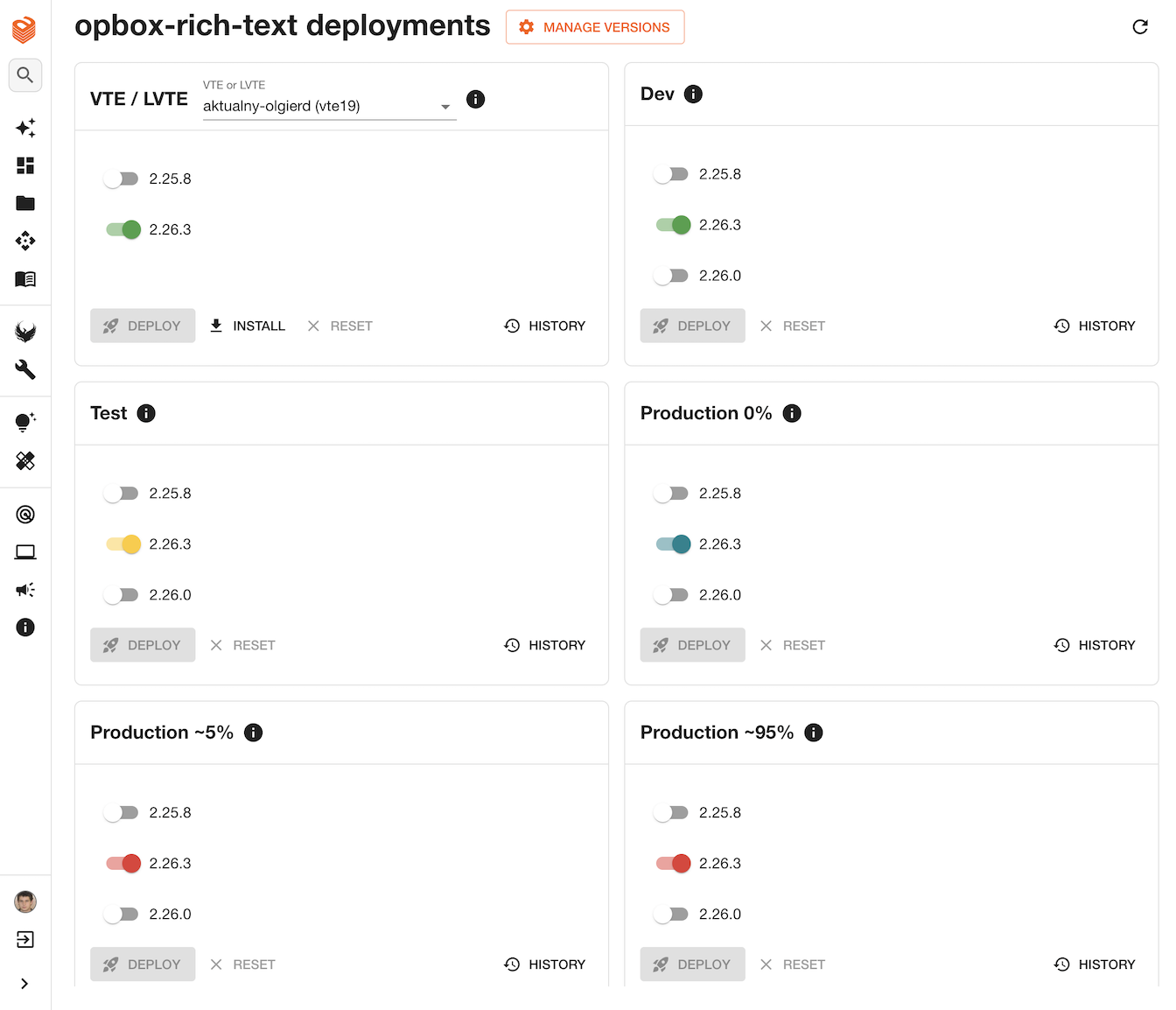
A new version must be enabled according to the defined environment order. The sequence is as follows:
-
Test — Assuming the new version was previously installed and enabled on a VTE, we can proceed straight to the test environment — the first environment visible from the external network, accessible at e.g. allegro.pl.allegrosandbox.pl.
-
Production 0% — Production instances of the opbox-web service that are accessible only from the internal network. No external user traffic is routed to them. This allows developers to verify their changes in the production environment before making them live to the public.
By enabling a version on the Production 0%, we activate it only on the instances belonging to this environment, leaving other production instances unchanged. This ensures strict isolation, allowing us to safely check our changes. The same principle applies to changes introduced on subsequent environments — Production 5% and Production 95%.
-
Production 5% — An environment with 5% of external traffic. It allows developers to check for any user errors before the version is enabled for everyone. Before the developer can proceed further, the version must remain enabled on 5% traffic for a minimum of 10 minutes.
-
Production 95% — The environment for the remaining 95% of traffic, considered the full production environment.
Once the new version is enabled on each environment, the developer verifies its functionality. The dev and test environments have their own dedicated URLs. However, production environments are reached by visiting the production URL (e.g. allegro.pl) and setting the appropriate HTTP header. To verify whether the page was ultimately served from the expected environment, developers can use our internal tool called the Opbox Inspector. They can also use it to check whether the served component version matches the expected one.
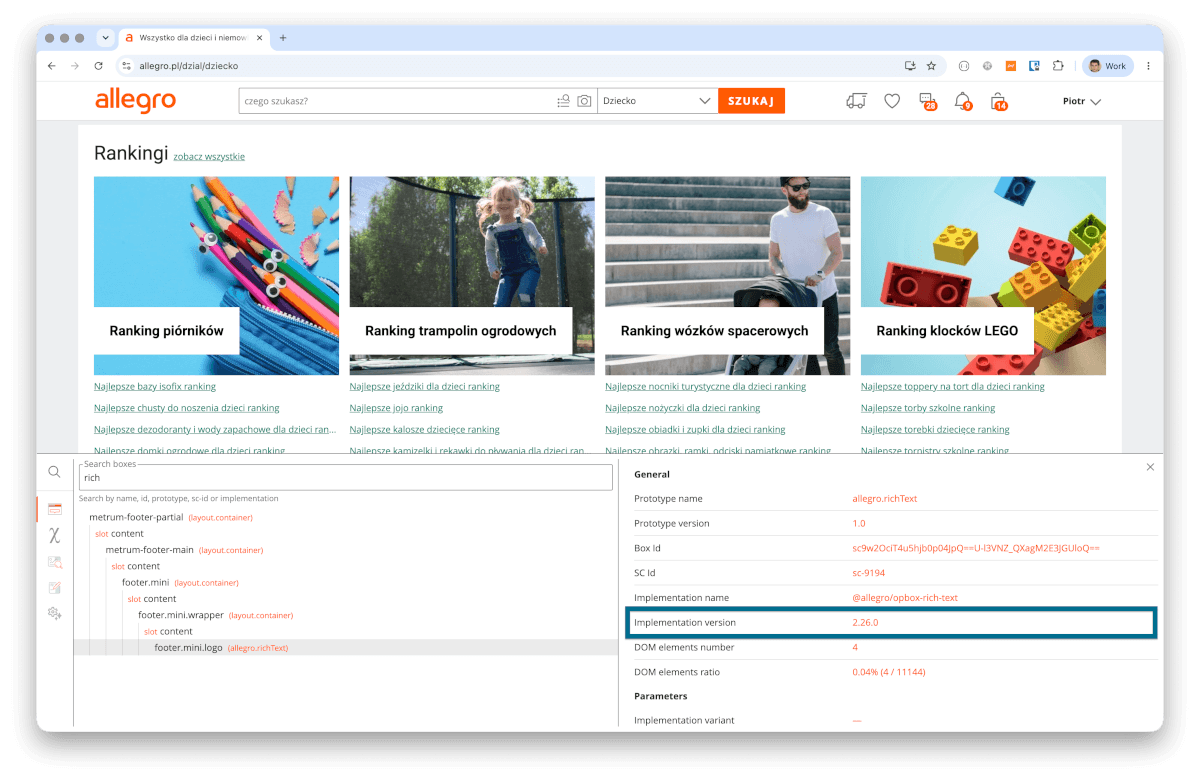
In addition to manual testing, the developer should monitor for any errors. The entire error monitoring process is detailed in the “Errors monitoring” section below.
Removing deprecated versions from the registry #
Once the version is successfully deployed to production, the final step is to remove the old version from the registry. This can be done immediately after deployment or after a certain period, during which the developer wants to maintain the ability to quickly roll back.
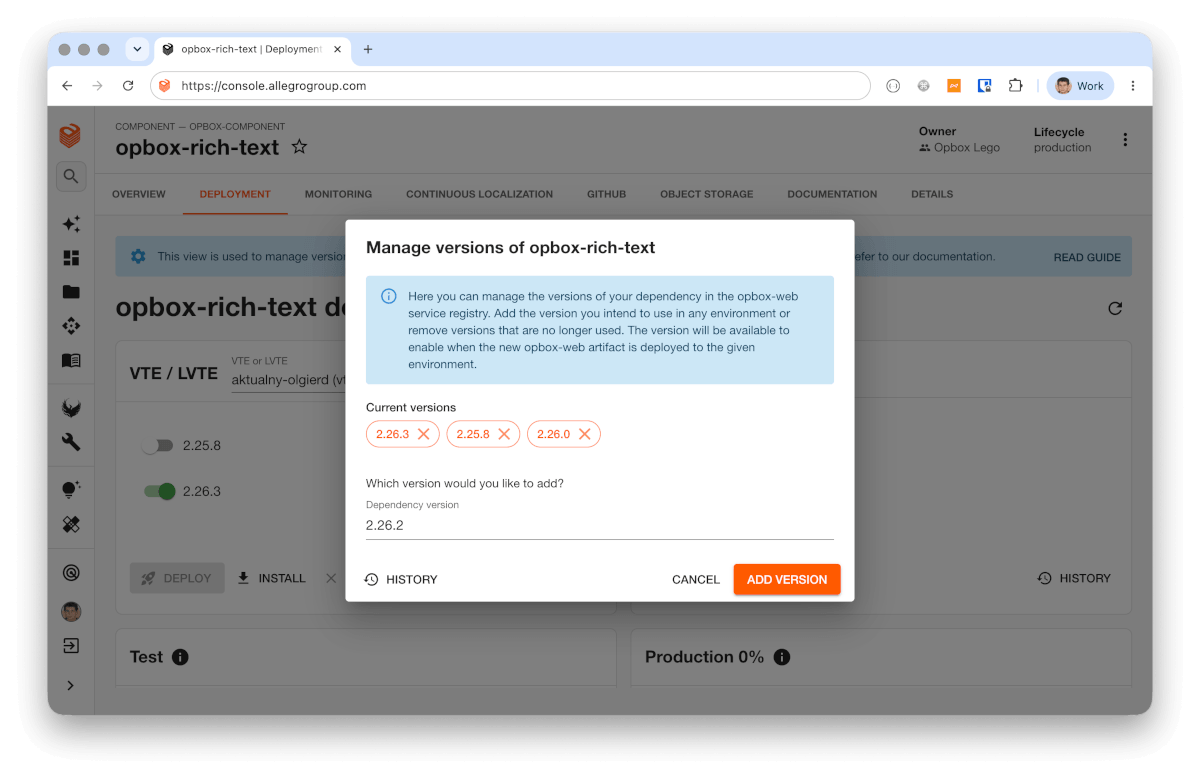
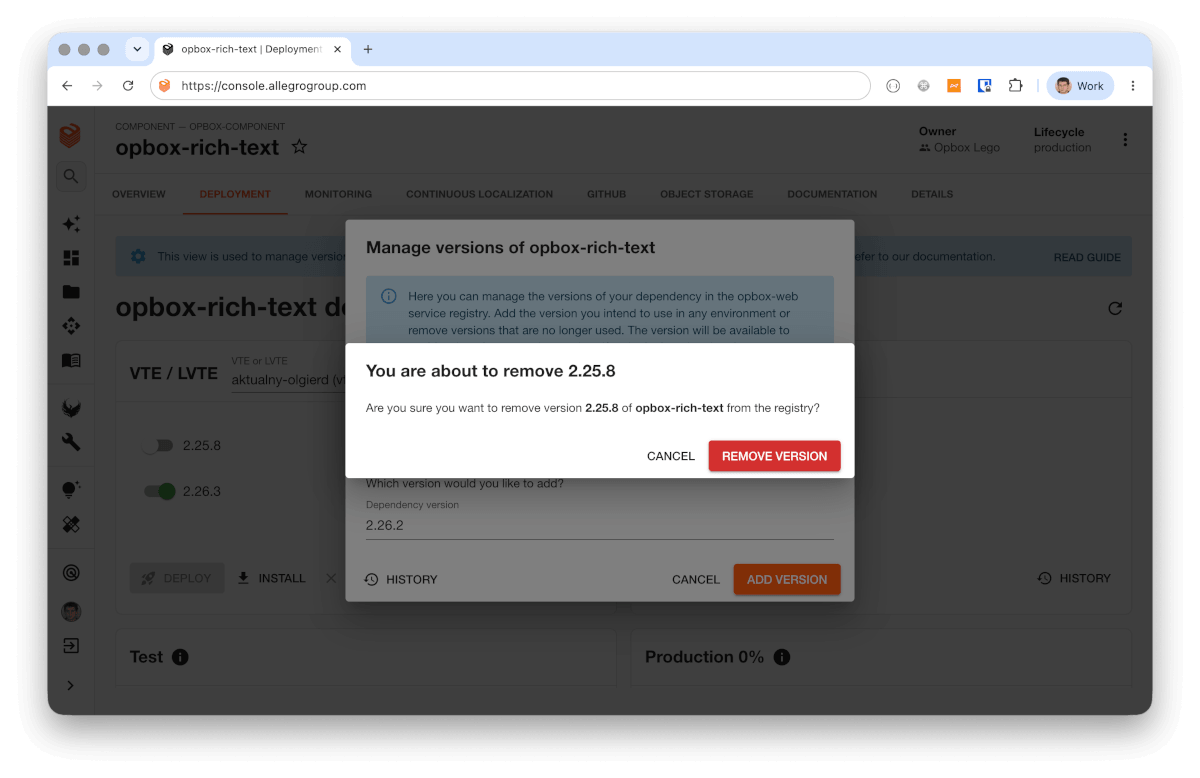
A version can only be deleted if it is not currently in use in any environment. Once a version is removed from the registry, it cannot be re-enabled in any environment. This process ensures that the opbox-web service can be deployed safely, without the risk of deploying it with a missing dependency version.
Change Auditability #
All changes made to the registry are saved in our service and can be displayed in Developer Portal when needed. Below is an example of the registry change history for a single component.
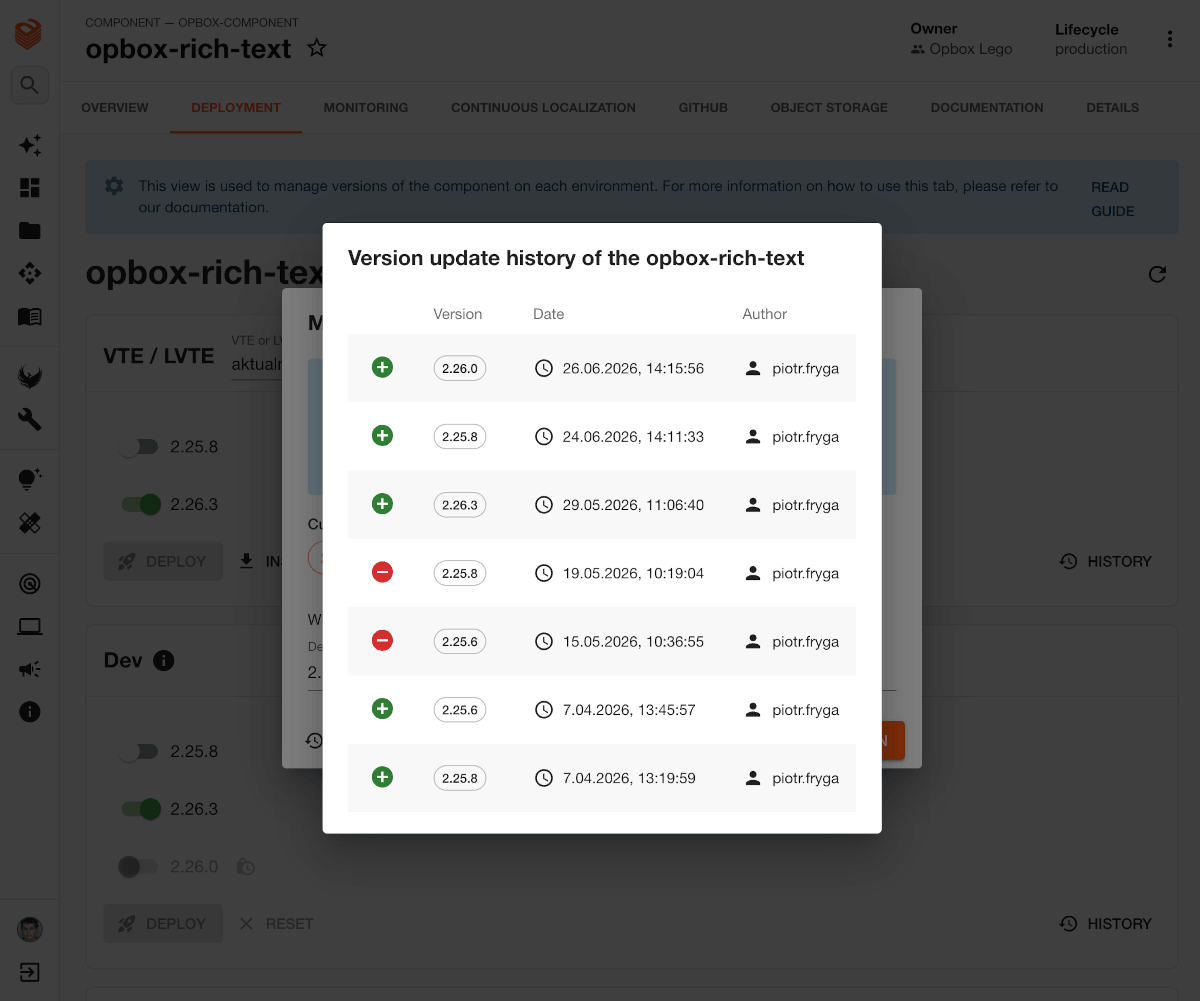
Errors monitoring #
We provide developers with a tool to deploy their projects freely at any time. Platform stability remains our top priority — therefore, improving access to logs, metrics, and immediate error reporting is a core part of this project. Consequently, we focused on two main areas: a dedicated error monitoring dashboard for each project and an alerting policy to route detected errors directly to the responsible teams.
Dashboards #
Every Opbox project has a dedicated page in Developer Portal, where developers can monitor their project’s performance and potential errors across all environments in real time.
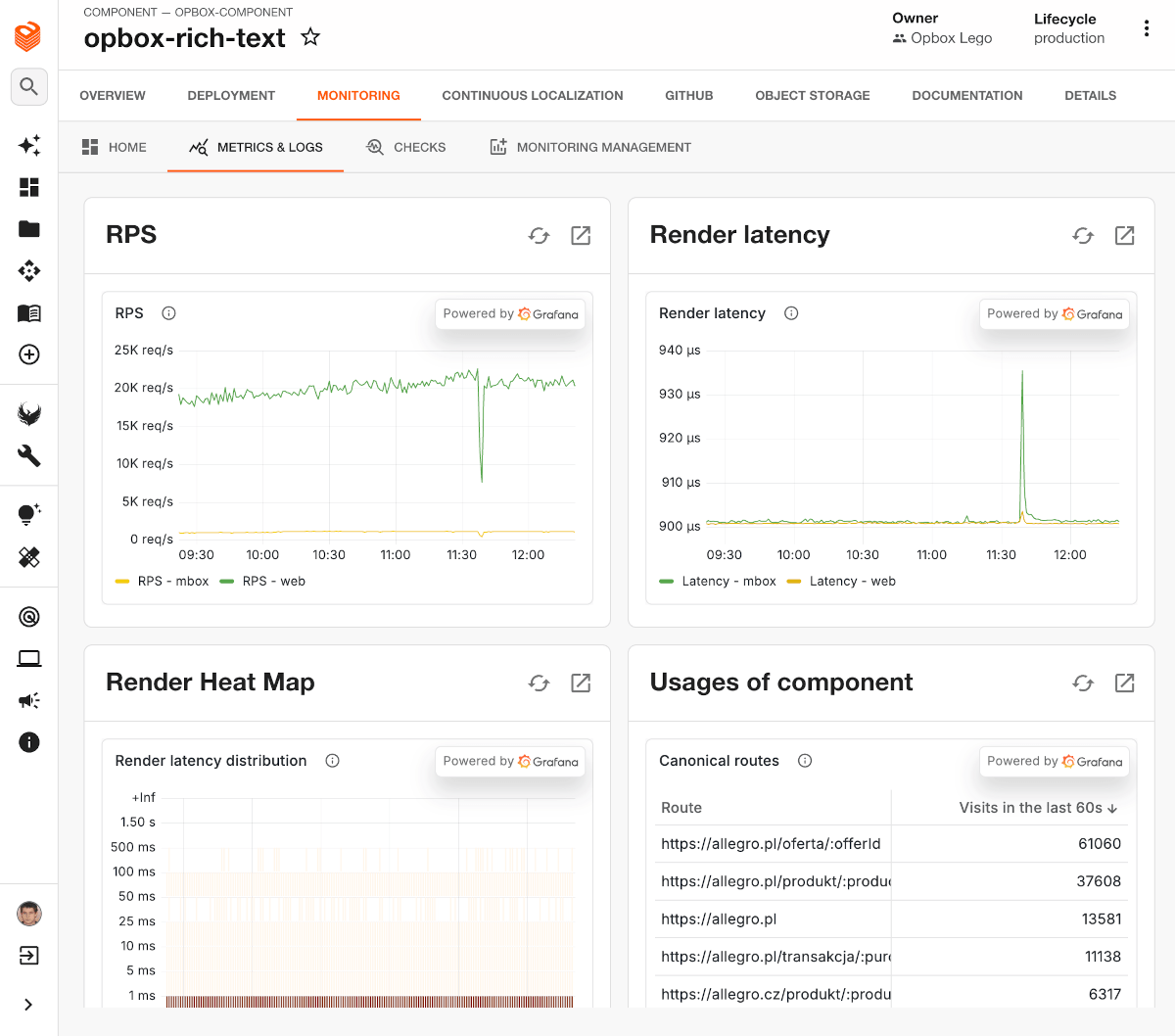
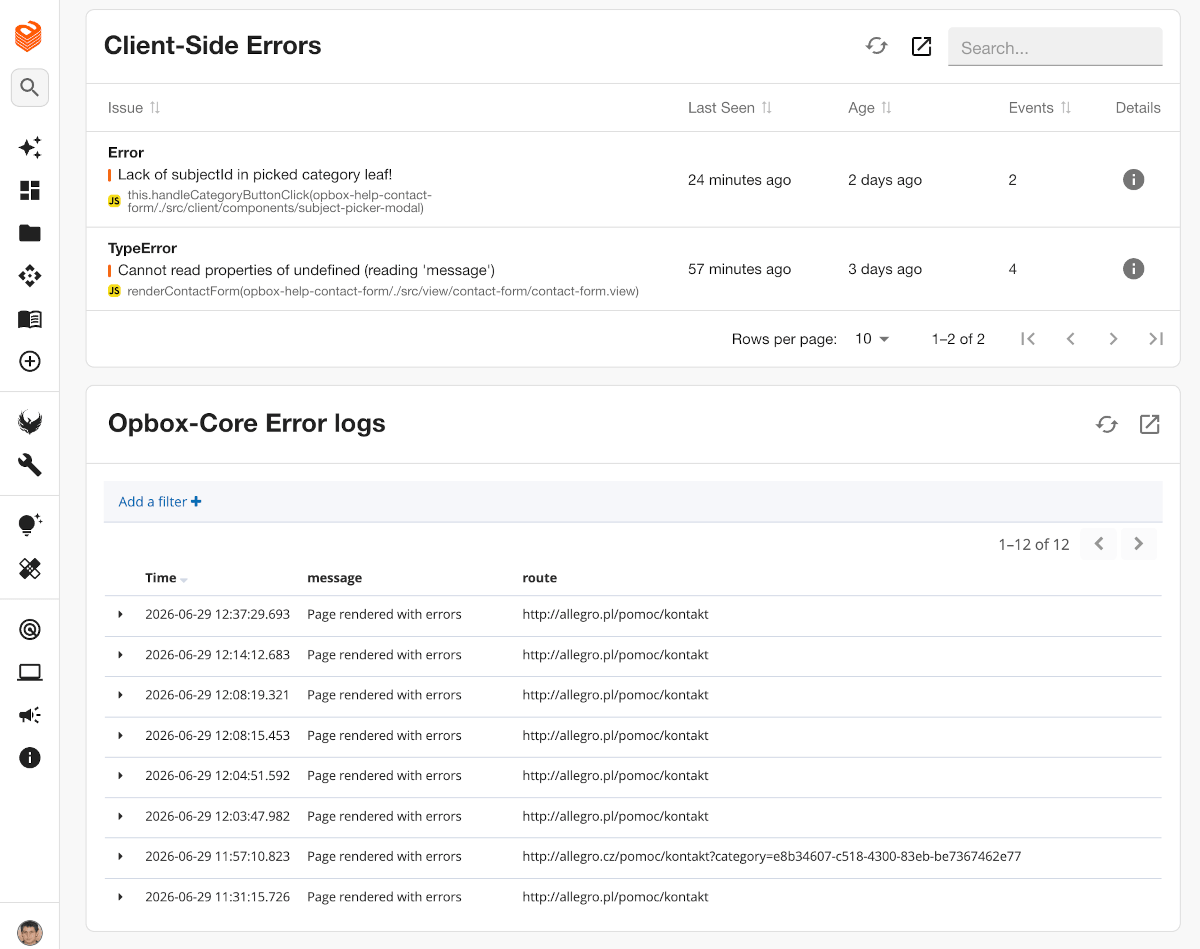
The first page section covers traffic volume and component rendering latencies. It also includes dependency usage details broken down by page URLs. Since we embedded live Grafana charts here, they are fully interactive. This allows developers to easily navigate to the source dashboards for further analysis.
The second section covers Kibana logs and errors from Sentry. It provides developers with details on rendering errors that affected their component. This includes both client-side and server-side errors for the project.
Alerting policy #
Notifications are the second essential pillar of our error monitoring. We decided that on-call engineers should be notified directly about their rendering errors. Previously, all rendering errors were routed to the opbox-web on-call engineer, who had to manually route the issue to the responsible team.
To achieve this, we designed an alerting process to notify on-call engineers about both client-side and server-side errors. We then carried out a migration to complete the monitoring configuration for each of these projects.
As a result, every team finds out about an error immediately after it occurs. This significantly reduces the risk of leaving a faulty version running in the production environment, thereby substantially increasing the stability of our platform.
Automated deployments of the opbox-web service #
For a newly added dependency version to become available for activation on the production environment in Developer Portal, the opbox-web service must be deployed to production first.
Since this is a repetitive process, we decided to automate it. As a result, it runs automatically three times per business day, deploying the service all the way from the development to the production environment. It doesn’t require an on-call engineer’s attention unless errors are detected.
How does the deployment process work? #
We based our deployment process on a GitHub Actions workflow. It runs automatically at scheduled times throughout the day, executing a series of steps that monitor and deploy the new version of the application across consecutive environments.
During the deployment of the opbox-web service, we use a Canary release. This is an additional environment used to verify that the deployed application version works fine. Developers cannot manage their component versions on Canary, as this environment is completely separated from the previously mentioned Production 0% and Production 5% environments. Instead, the Canary environment mirrors the configuration set for Production 95%.
Here is a simplified look at the opbox-web deployment workflow in 6 steps.
-
Build and publish — This is the first step in the workflow, which builds the opbox-web service package with the latest dependency registry. The package is then re-verified and published to Artifactory.
-
Deploy to sandbox — The new package is deployed to allegro.pl.allegrosandbox.pl.
-
Deploy to Canary 0% — The package is deployed to Canary 0%
-
Run automatic tests — We run a script against the Canary 0% environment to test the critical path and ensure no errors occur.
-
Generate synthetic traffic — Generating synthetic traffic for 8 minutes on selected pages to analyze metric behavior, including response latency and page rendering times.
-
-
Set Canary traffic to 1%. — Route 1% of external traffic to the Canary environment. After a 10-minute monitoring period with no errors detected, the workflow automatically moves to the next step.
-
Set Canary traffic to 10%. — The Canary traffic share is bumped to 10%. The process runs another 10-minute monitoring window before automatically moving forward.
-
Deploy to Production — Deploying the new application version to 100% of traffic. Once this step is complete, we automatically notify developers that the opbox-web version has been deployed, making the new versions of their dependencies available for activation on the Production 0%, Production ~5%, and Production ~95% environments.
What about deployment safety? #
Before every deployment to any environment (Canary 0% / 1% / 10% / Production), we check for any reported outages in our ecosystem and verify that the current time falls within the allowed deployment hours. If no blockers are found, we proceed with the deployment process.
The entire pipeline is constantly monitored by automated checks. If any error is detected or if any metric goes above the allowed threshold, the process automatically stops and notifies the Opbox on-call engineer.
They then decide whether the deployment process can continue. If so, they rerun the process from where it stopped.
Independent deployments in numbers #
Numbers tell the best story of any project. Below are a few key metrics and charts illustrating the true scale of our solution (as of publication):
- Total opbox-web dependencies (components, plugins, services): 1206
- Teams responsible for dependencies: 126
- Automated opbox-web deployments: 371
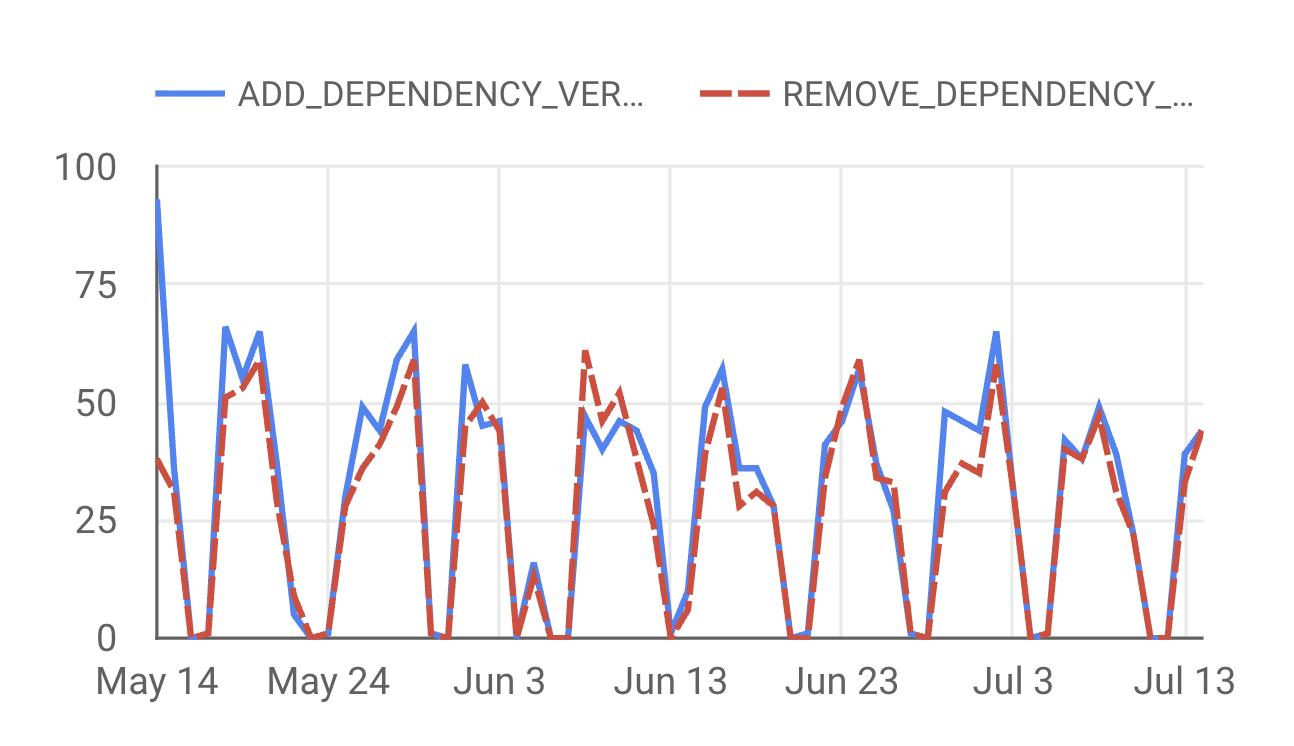
- Operations (adding or removing) on registry: 2408 (since April 2026)
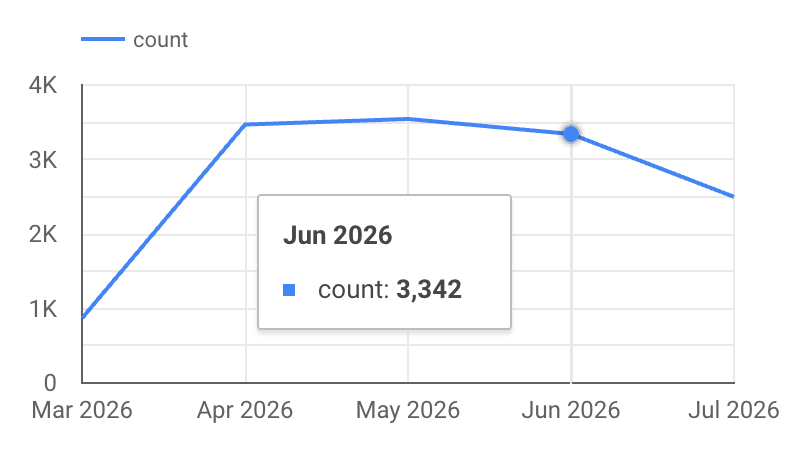
- Dynamic installations on VTE: 32207 (since September 2025)
Adding and removing versions from the registry via Developer Portal:
Dynamic installations of versions on Virtual Test Environments (VTEs):
Savings from Independent Deployments #
Introducing a new approach for deployments has drastically reduced the time required to deploy a single change to production. To better illustrate the scale of savings, we will use Man-Days as our unit of measurement. This allows us to calculate how many days we save because our developers no longer spend time on individual deployment-related processes.
Below Man-Days (MD) saved by month for Q2 2026.
| Month | Projects | Independent deployments | Dynamic installations on VTE | MD Saved total |
|---|---|---|---|---|
| Jun. | 1192 | 136.48 | 104.44 | 240.92 |
| May | 1191 | 89.55 | 110.75 | 200.3 |
| Apr. | 1177 | 77.47 | 108.41 | 185.88 |
How do we count it? #
We calculate monthly savings in Man-Days based on the following metrics:
-
Man-Days saved by independent deployments
Each individual deployment using the new solution saves ~40 minutes compared to the previous approach, where the developer was directly involved in the release process (confirming attendance, verifying that the change works, waiting for other teams, and handling reverts in case of errors).
The ability to add or remove a version from the registry directly via Developer Portal — instead of manually updating the repository, waiting for team approval, waiting for CI builds, and merging the change — saves another ~15 minutes.
To calculate the total savings, we aggregated this time, multiplied it by the number of deployments, and converted the result into Man-Days (total minutes / 60 / 8).
-
Man-Days saved by dynamic installations
Each individual version installation on a VTE environment saves us ~15 minutes, as it requires just a single click instead of manually changing the version on a branch, building the artifact, and deploying it to VTE.
Multiplying this by the total number of dynamic installations gives us the overall savings in Man-Days (total minutes / 60 / 8).
In June alone, this solution saved us more than 240 working days across the entire organization, which translates to approximately 11 FTEs (Full-Time Equivalents).
Developer Satisfaction #
We asked developers across our organization to share their feedback on the new deployment process.
Developer Satisfaction: Average Rating (1-10)

Developer Satisfaction Breakdown (NPS Categories)

To measure the results, we evaluated both the initial migration phase and the ongoing experience using a scale from 1 to 10. Treating scores of 9-10 as Promoters, 7-8 as Passives, and 0-6 as Detractors, the metrics shaped up as follows:
-
Ongoing Experience (Overall assessment of the independent deployment process): Achieved an average rating of 8.7/10, resulting in a Net Promoter Score (NPS) of +64, with 64% of respondents acting as active Promoters of the new deployment approach.
-
Migration Process (Evaluating the migration of projects to independent deployments): Achieved an average rating of 9.7/10, resulting in a NPS of +87, with 87% of surveyed developers falling into the Promoter category.
What have we achieved? #
Our journey to change the opbox-web deployment approach took two years. As a result, we now have a solution that allows developers to deliver new features to production much faster. Developers feel safer with this approach because they can quickly restore the previous version at any time, even outside of business hours.
Service deployments are smooth and regular. They take less time and are much safer than before. We no longer face situations where a developer finds a bug, rolls back a change, and blocks everyone else from deploying. The deployment process constantly monitors for errors and reacts immediately if they occur.
The new solution is much more convenient for developers. There is no longer a need to modify opbox-web files and manually open pull requests. This has been very well received by the developer community in our organization.
It is also highly beneficial for us, the Opbox engineers. We now handle errors that actually relate to our application, not its dependencies. Additionally, we no longer perform manual deployments because the automation handles them for us and we can focus on further development of the Allegro platform.