
- “Google says 75% of the company’s new code is AI-generated” — BusinessInsider, Apr 2026
- “A 13-hour interruption to Amazon Web Services’ (AWS) operations in December was caused by an AI agent, Kiro, autonomously choosing to ‘delete and then recreate’ a part of its environment” — TheGuardian, Feb 2026
- “Spotify says its best developers haven’t written a line of code since December, thanks to AI” — TechCrunch, Feb 2026
“So yeah, in theory AI is supposed to speed things up, but in practice the output is non-deterministic — every time I use it I end up with poor-quality code, unmet requirements, no tests, and I have to fix everything manually or rewrite the code from scratch. More harm than good from this AI.” — said one of my colleagues.
The future of development is happening now — AI, to a greater or lesser extent, is used to assist software development every day, by nearly all of us. Unfortunately, the traditional approach of working with current large language models (LLMs) through free-form conversations (a.k.a. vibe coding) typically leads to:
- accumulation of technical debt
- architectural inconsistency
- unmet requirements
- gradual model drift away from our intent (a.k.a. intent drift)
What if there were a way to tame the pain points of coding agents and actually boost our productivity? The answer to the limitations of current LLMs in autonomous software development is Spec-Driven Development (SDD).
What is SDD? #
“Wait, SDD? I’ve heard of it — what exactly is it?”
Specification-Driven Development (SDD) is a software development methodology in which the specification is the single source of truth about the system. Code is generated based on that specification.
Unlike Waterfall, in SDD the specification is created iteratively — you should never aim for a complete specification in one shot. It evolves over time and is meticulously maintained throughout the entire system lifecycle. Because the specification serves as the source of truth for both humans and AI agents, it becomes a critical element of project hygiene in teams that adopt SDD.
In one of the articles on Martin Fowler’s website, three levels of SDD are distinguished:
- Spec-first: A well thought-out spec is written first, and then used in the AI-assisted development workflow for the task at hand.
- Spec-anchored: The spec is kept even after the task is complete, to continue using it for evolution and maintenance of the respective feature.
- Spec-as-source: The spec is the main source file over time, and only the spec is edited by the human — the human never touches the code.
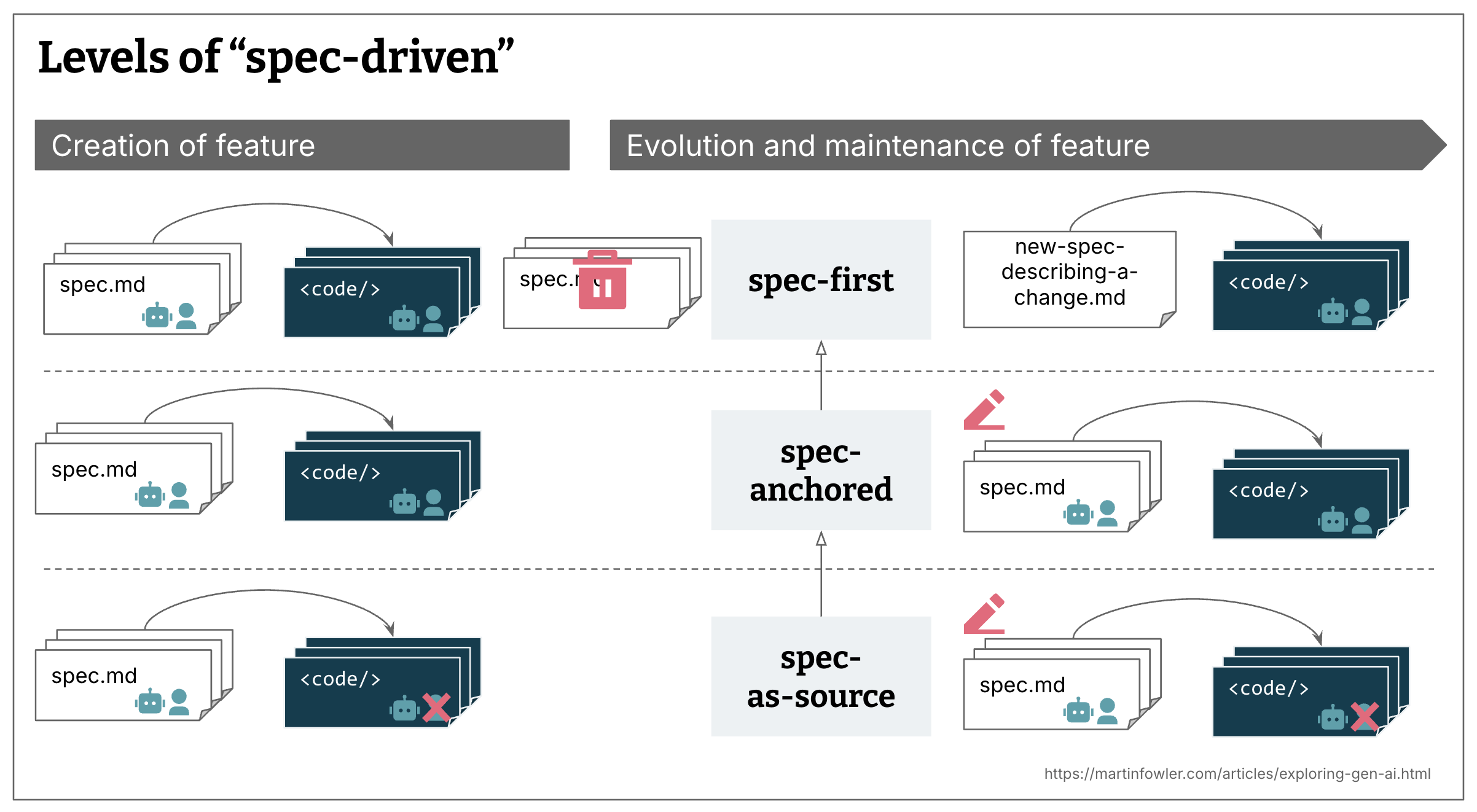
Before we dive in — from the three levels described above, the rest of this article focuses on Spec-anchored: the specification lives alongside the code, both evolve together, and both are reviewed by the team. Spec-as-source is an exciting direction, but we’re not quite there yet.
How to SDD? #
“Okay, so how do I actually use it? Do I just throw my requirements at the agent and hope for the best?”
At its simplest, the SDD concept boils down to:
- Gather requirements
- functional, non-functional, mockups, etc.
- from stakeholders, Product Managers, UI Designers, or by exploring the project’s source code
- Write them down as a specification
- typically in one or more
.mdfiles
- typically in one or more
- Implement based on the specification
- using an AI agent
For lightweight, low-complexity tasks (e.g. adding a new field to an API), SDD is likely overkill — unnecessary overhead that complicates a simple task. In such cases, a sufficiently precise one-shot prompt or a short conversation with the agent within a single session works just as well (and perhaps even better, since it’s equally effective but simpler).
SDD starts to deliver real value when you’re working on a complex problem with many important requirements that cannot be skipped. LLMs have a limited context window and a tendency to drift and hallucinate — which makes solving complex problems within a single session increasingly difficult. SDD helps keep the language model on track, and course-correct when needed.
One could therefore say that the goal of SDD is to have the agent interpret and “understand” instructions in a way that aligns with the human’s intended intent — given the current limitations of LLMs, especially during complex tasks.
A more structured form of SDD might look like this:
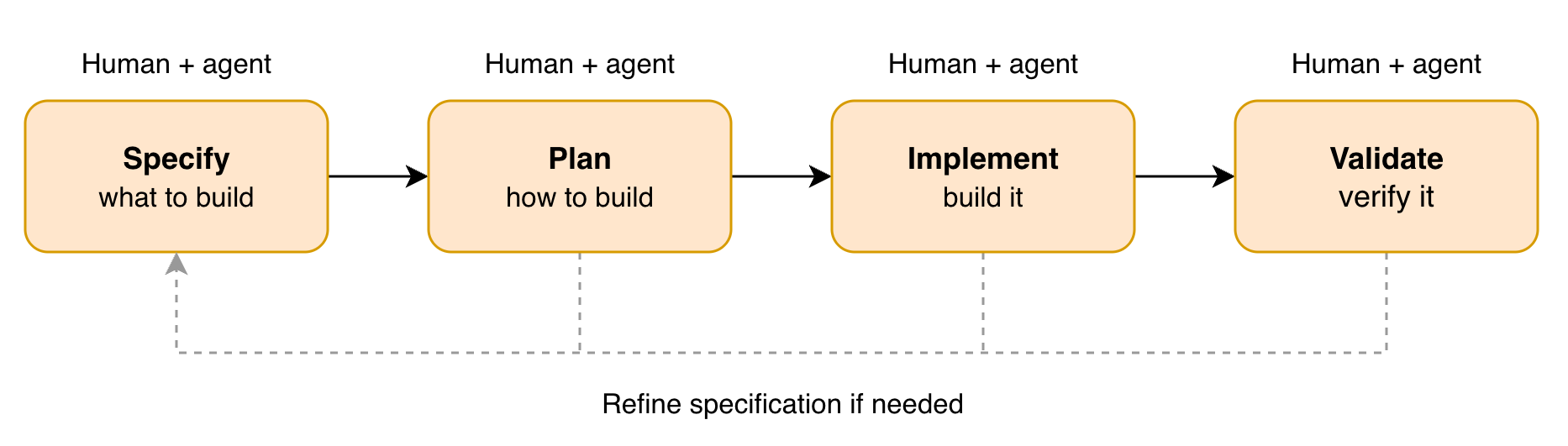
- Specify
- gather product/functional requirements (e.g. from stakeholders, Product Managers) — write them as e.g.
PRODUCT-SPEC.md - gather technical requirements (e.g. by exploring the project’s source code) — write them as e.g.
TECHNICAL-SPEC.md - (if needed) gather integration requirements (e.g. API contracts, events, protocols) — write them as e.g.
INTEGRATION-SPEC.md - (if needed) prepare mockups
- gather product/functional requirements (e.g. from stakeholders, Product Managers) — write them as e.g.
- Plan
PRODUCT-SPEC.md+TECHNICAL-SPEC.md(+INTEGRATION-SPEC.md, mockups if applicable) decomposition intoPLAN.mdwith progress tracking and implementation details per task (task = execution plan)
- Implement
- implement each task separately following the
PLAN.md
- implement each task separately following the
- Validate
- tests
- agent review
- manual review
The above flow (in this or similar variations) is currently the most common pattern implemented by SDD-supporting tools, for example:
The perfect specification… but what does that mean? #
“Alright, alright… maybe it’s worth at least trying. So how do I write a perfect specification, hand it to an AI coding agent, and get enterprise-quality code in one shot?”
Actually… there’s no such thing as a “perfect specification”. A good specification is one that is readable, understandable by agents (and people), and
contains the right amount of detail for the given context (which is a difficult thing).
A specification can take different forms depending on the perspective (stakeholder, Product Manager, UI Designer, Software Engineer, etc.).
Also, as I mentioned before — creating a specification is an iterative process. In practice, there are two types of iterations:
- iterating on the specification itself — you work with the agent to create or refine the specification; the agent helps ensure your intent is clear, the language is not vague, and the requirements are coherent.
- iterating based on implementation feedback — you generate code from the specification, gather feedback from the results, and feed that feedback back into the specification.
I’ve found some best practices (so far) that help write good specifications — and consequently lead to better results during SDD sessions.
It [must / should / should not] contain #
A good specification must contain:
- product description — what the product is, what problem it solves, why we’re building it
- users — who will use the product, what roles exist
- functional requirements — what the system should do (list of features)
- non-functional requirements — reference to a shared document or dedicated requirements
- UI description — how the interface should look, described in text or mockups
- use cases — especially when the logic is complex and there are many edge cases
It should contain (and must if the solution is complex or integrates with external services):
- technical specification (architecture, technical decisions, ADRs, technology stack)
- data model
- API definition
- security and authentication information
- edge cases, non-happy paths
It should not:
- contain implementation details if not necessary
- be written by one person — the best specification is a collaborative effort of different specialists (Product Manager, Software Engineer, UI Designer, etc.)
Balanced level of detail #
When under-specifying (too vague), the agent will approach the implementation very broadly, with too much room for its own interpretation. When over-specifying (too detailed), the agent will approach the implementation very precisely, but at some point the line between specification and code starts to blur — and the specification loses its value.
The point is for the agent (or human) to process intentions into precise instructions. The specification should precisely define what we care about, and leave things of little importance to the agent’s discretion.
Risk management #
The level of detail in the specification should depend on the risk level of the software.
Low criticality = low consequences = low control → greater acceleration
For example, we need to quickly write a script that runs only locally — the specification can be simple.
High criticality = high consequences = high control → less acceleration
For example, we’re writing a financial service — the specification should contain all the important details.
Separate “what” from “how” #
It’s important to keep the specification (what to build) and the execution plan or task (which piece to build next, and how) as separate documents. Merging them into one creates confusion.
Think of the specification as a blueprint — a complete picture of the desired system. The execution plan, on the other hand, is a delta — a focused set of changes to introduce at a given point, often including implementation details. Unlike the specification, the execution plan is volatile — it can be discarded once the task is done and doesn’t even need to be stored in the repository.
This separation makes iterative work possible: the specification describes the entire product, while you tackle it in small, manageable chunks — one task at a time.
Shared technical requirements #
A valuable practice is extracting technical, non-functional requirements into a separate, shared file (e.g. SHARED-TECHNICAL-SPEC.md) that defines
organization-wide standards:
- Availability & Reliability — service stability
- Performance & Scalability
- Security & Privacy
- Organizational Guidelines — compliance, technical standards
Thanks to that:
- individual product specifications stay shorter (no repeated shared requirements)
- common standards are maintained in a single place
- a simple reference with a link is enough in each specification
One specification vs. specification per feature #
In practice, specification per feature works better for medium-to-large projects — especially in existing projects (brownfield). Per-feature format keeps things lighter for the context window, is easier to maintain and has a much better chance of actually surviving over time.
A single, monolithic specification gives you the full system picture in one place, but it tends to cause context size problems and becomes hard to maintain as the project grows.
Review & refine #
It’s very hard to write a complete specification on the first try — review what you’ve written yourself, ask your teammates and an agent to review it too.
Run the agent multiple times — each time you’ll get feedback, but the value of comments decreases. When the agent starts nitpicking trivial things, you know the specification is good — that’s a signal that the most important issues have already been addressed.
I’ve got the specification — now what? #
“Okay, I think I’ve written a good specification — now what? Will the LLM generate everything else for me?”
Almost… After creating, reviewing, and accepting the specification, it’s time to implement it… or rather, delegate the implementation. But how do you “instruct” agents to produce code that meets your expectations? A huge part of it is the specification itself, but supervising the implementation is also crucial. Here are some more best practices (so far) for this phase.
Decomposition #
If the specification has many requirements and features, don’t try to implement them all at once. Instead, divide the specification into separate tasks (as we naturally do) during the Plan phase, and then implement the tasks independently during the Implement phase.
Of course, you can ask the agent to read all specification files and implement an entire feature or even a whole app — it will work somehow, but the results may not meet your expectations, especially for bigger changes. That’s because the context window is limited and LLMs are most effective when focusing on a single task.
Acceptance criteria #
AI agents are designed to achieve specific goals, so the results are better when the agent knows what its goal is in your specific context. Models are getting better
at catching our intentions, but explicit acceptance criteria written for each task in the .md file leave no room for doubt — they are clear for both humans and
agents, enable straightforward feedback loops, and make the output more predictable.
Test-Driven Development (TDD) #
Just as AI agents are designed to achieve goals, TDD by design leads to achieving a goal (a green test).
I’m not claiming that TDD is the solution to all the problems — I’m saying that a solid, reliable test is a decent acceptance criterion and a feedback loop for the agent during code generation, one that helps avoid unexpected bugs. Even if you’re not a huge fan of TDD — I recommend giving it a try :)
Behavior-Driven Development (BDD) #
BDD takes TDD a step further — instead of testing implementation details, expected user behavior is described in a human-readable format (e.g. Given/When/Then). This is especially valuable for frontend applications, where the specification often describes user flows and interactions.
Combined with Playwright MCP Server, this becomes a powerful feedback loop — based on BDD scenarios, the agent can open the application in a real browser, capture screenshots, analyze the UI, fill out forms, click buttons, and iterate until the tests pass.
Project template #
If you’re creating a project from scratch (greenfield), it’s worth generating an empty project in the technology stack you’ll be using. You can even add dependencies upfront — for example, if you want the agent to use a specific HTTP client or database driver.
For existing projects (brownfield), the agent will familiarize itself with the parts of the project it needs at the time.
Regardless of whether it’s greenfield or brownfield — before the Plan/Implement phase, it’s worth using the /init command so the agent generates an AGENTS.md
file.
Evaluation #
After implementing a piece of the specification (a task), evaluate the results and ask yourself: am I satisfied? A useful technique is to start a new, clean session and ask another agent to assess the output — a fresh context often catches things you’ve missed.
At the end of the day, you are the one signing off on this code, regardless of whether you wrote it yourself or with the help of an agent. You are accountable for the code in production, so don’t go YOLO — do a thorough review, fix what needs fixing, and then commit the changes.
Refine, refine, refine #
I’ve mentioned this a few times already, and that’s intentional — refining the specification doesn’t apply only to the Specify phase. It applies to every phase. Every time you prompt the agent to change something or make a change manually, it’s very likely that the specification was missing something. Update the specification after every change you make — keep the source of truth up to date.
SDD workflow — a practical example #
“Can you give me a simple example of how I might work with SDD?”
First of all, you don’t need any external tool to work with SDD, and I suggest you try a “raw SDD session”. Try explaining to the LLM by yourself that you want to implement feature X (brownfield) or even a whole new app (greenfield) using the SDD approach — what phases you expect and what documents it should produce. Just for practice, to understand it better.
Write a specification (Specify) #
This process includes:
- dialog with an LLM
- review by agents
- review by people
The best way to create a specification is in a dialog with an LLM. You describe what you want to build, and the assistant helps structure the requirements, suggest a breakdown, and identify missing elements.
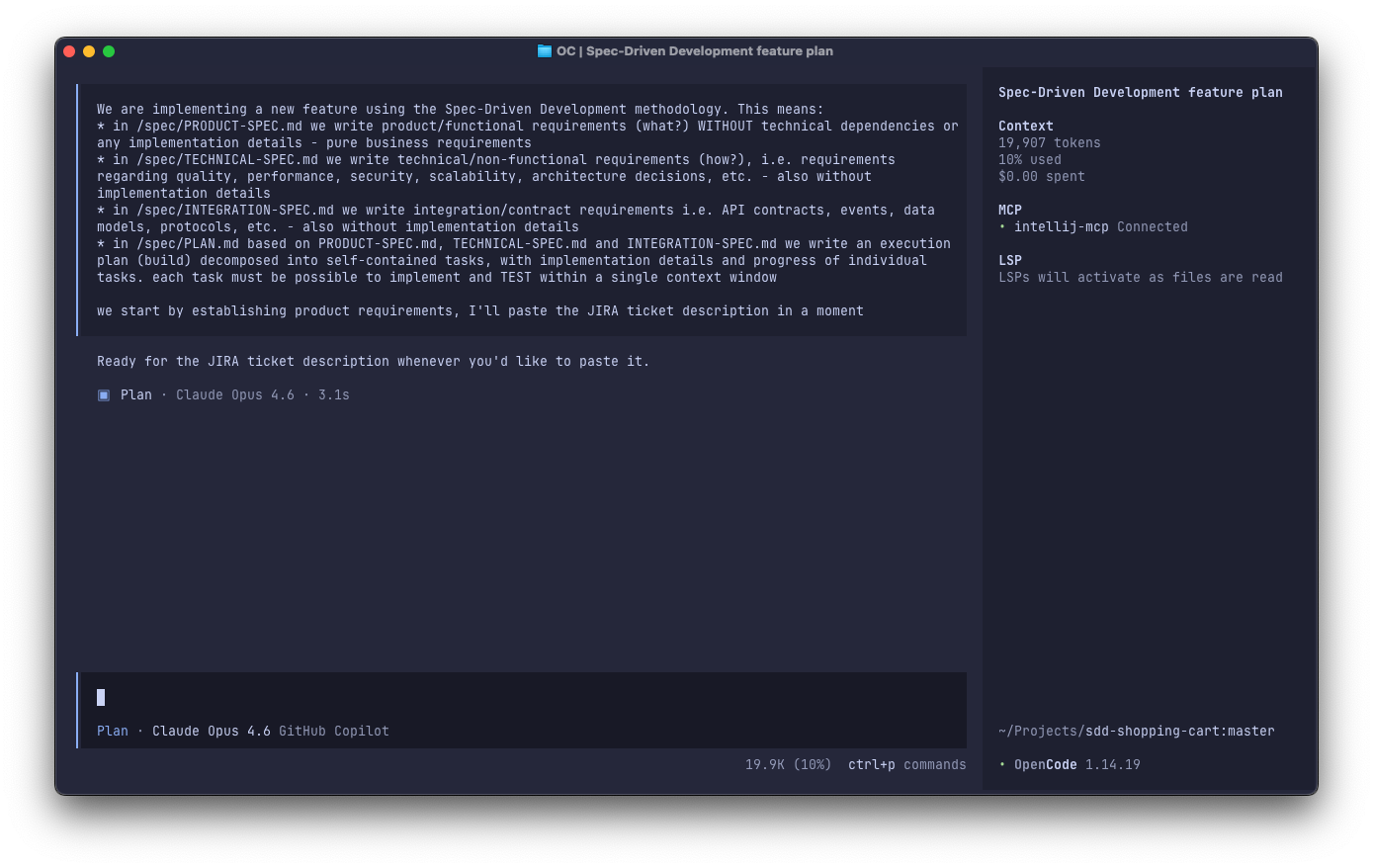
You can even start with a simple prompt like this:
We are implementing a new feature using the Spec-Driven Development methodology. This means:
* in /spec/PRODUCT-SPEC.md we write product/functional requirements (what?) WITHOUT technical dependencies or any implementation details - pure business requirements
* in /spec/TECHNICAL-SPEC.md we write technical/non-functional requirements (how?), i.e. requirements regarding quality, performance, security, scalability, architecture decisions, etc. - also without implementation details
* in /spec/INTEGRATION-SPEC.md we write integration/contract requirements i.e. API contracts, events, data models, protocols, etc. - also without implementation details
* in /spec/PLAN.md based on PRODUCT-SPEC.md, TECHNICAL-SPEC.md and INTEGRATION-SPEC.md we write an execution plan (build) decomposed into self-contained tasks, with implementation details and progress of individual tasks. each task must be possible to implement and TEST within a single context window

we start by establishing product requirements, I'll paste the JIRA ticket description in a moment
After a few iterations we’ve got PRODUCT-SPEC.md:
# Allegro-Style Cart Application Specification

## Product Overview

### What is this product
A new version of the shopping cart currently found at `https://allegro.pl/koszyk`.
The version preserves functionalities and overall UI structure.

The UI supports adding items to the cart, editing quantities, removing items, an **empty state**.

The UI supports a mocked recommended products carousel to demonstrate one‑click add‑to‑cart.

### For whom is this product
Users adding and reviewing items prior to checkout.

## Functional Requirements (Product-Level)

1. Cart items are grouped by seller.
2. Show empty cart screen when no items are in the cart.
3. Summary panel with the total price of selected cart items.
4. English language baseline (centrally managed copy). Currency in PLN
5. Entire cart, seller, and each item can be selected with checkboxes for checkout or removal.
6. Each cart item shows:
   - Product image thumbnail
   - Product title
   - Quantity selector (1 to 99)
   - Price per unit (smaller when quantity > 1)
   - Total price for that item (price * quantity). Displayed only when quantity > 1.
   - Remove icon
7. Entire cart bar is displayed at the top with:
   - "Select All" checkbox on the left
   - The "Remove" link on the right. When clicked, a dropdown menu appears with two working options:
     - "Remove selected items"
     - "Remove all items"

### Technical & Non-Functional Requirements
See [Technical Spec](TECHNICAL-SPEC.md).

---
TECHNICAL-SPEC.md:
# Technical Specification

## Overall Technical Requirements
- Cart changes are visible immediately (use optimistic updates, requests are done in the background).
- Light and dark mode supported
- Fully responsive UI (mobile, tablet, desktop) with adaptive layouts, touch-friendly interaction.

## Non-Functional Requirements (Reference)
This product relies on the shared organization-wide Non-Functional Requirements: [Shared Technical Spec](SHARED-TECHNICAL-SPEC.md)

---
(optional) SHARED-TECHNICAL-SPEC.md:
# Shared Non-Functional Requirements (NFR)

This document defines organization-wide non-functional requirements.
Individual service specs may only tighten (never relax) these requirements unless an approved exception (architecture decision record) exists.

## 1. Reliability
* Services MUST provide read-after-write consistency for single-resource fetches after successful 2xx mutations.
* Client retries for idempotent operations MUST be side‑effect free.

## 2. Availability
* Monthly availability objective: ≥99.9%.
* Rolling deployments MUST avoid serving traffic from unready instances (readiness & liveness probes mandatory).

## 3. Performance
* Per-endpoint latency metrics (p50, p90, p95, p99) MUST be published.
* Baseline targets (unless tightened): p95 read ≤250 ms; p95 simple write ≤400 ms under nominal load.
* Batch / list endpoints MUST use indexed access (no full table scans for routine queries).
* Large collections MUST support cursor pagination (offset only for small <5k stable sets).

...

## 14. Operability & Support
* Each service MUST maintain runbooks for: high latency, partial dependency outage, elevated error rate, rate-limit tuning, rollback.
* Migrations MUST be reversible or have a documented rollback strategy.
* Feature flags MAY control progressive rollout; a kill-switch SHOULD exist for risky features.
* Alerts MUST be actionable and link to runbooks (no unactionable noise).

---
(optional) INTEGRATION-SPEC.md:
# Integration Specification – Cart Service

This document defines API contracts, event schemas, data models, and protocols for the Cart domain. It is
implementation-agnostic.

Full API reference: `https://shopping-cart-service.dh-prod.qxlint/swagger-ui/index.html`

---

## 1. API Overview

Base path: `/api/v1/cart`

All endpoints require `Authorization: Bearer <token>` and `X-Request-Id` headers. All mutations use optimistic
concurrency via `If-Match` / `ETag` on the cart `version` field. All mutations return the full updated cart state to
support optimistic UI updates.

| Method & Endpoint             | Notes                                          |
|-------------------------------|------------------------------------------------|
| `GET /cart`                   | Items grouped by seller + price summary        |
| `POST /cart/items`            | `Idempotency-Key` required. `409` if duplicate |
| `PATCH /cart/items/{itemId}`  | `quantity` (1–99) and/or `selected`            |
| `PATCH /cart/selection`       | Scope: `"all"`, `"seller"`, `"items"`          |
| `DELETE /cart/items`          | Scope: `"selected"` or `"all"`                 |
| `DELETE /cart/items/{itemId}` | Single item removal                            |

### Key conventions

- **Monetary values**: integers in minor currency units (1 PLN = 100). No floating point. Currency is always PLN.
- **Timestamps**: UTC ISO-8601, server-generated.
- **Errors**: RFC 7807 Problem Details format.
- **Concurrency**: `If-Match` required on mutations. `412 Precondition Failed` on version mismatch — client must
  re-fetch and retry.

---

## 2. Domain Events

Emitted asynchronously for downstream consumers (analytics, recommendations, inventory).

| Event               | Trigger                                                           |
|---------------------|-------------------------------------------------------------------|
| `cart.item.added`   | Product added. Payload: `userId`, `productId`, `quantity`         |
| `cart.item.removed` | Item removed. Payload: `userId`, `productId`, `itemId`            |
| `cart.cleared`      | Bulk/full removal. Payload: `userId`, `scope`, `removedItemCount` |

Common envelope: `eventId` (UUID), `eventType`, `occurredAt` (UTC ISO-8601), `data`.

---

## 3. Data Model (Logical)

### Cart

| Field     | Type    | Constraints                  |
|-----------|---------|------------------------------|
| `userId`  | string  | PK. One cart per user.       |
| `version` | integer | Auto-incremented on mutation |

### CartItem

| Field          | Type     | Constraints           |
|----------------|----------|-----------------------|
| `itemId`       | string   | PK, server-generated  |
| `userId`       | string   | FK to Cart            |
| `productId`    | string   | Unique per user       |
| `sellerId`     | string   | Snapshot from catalog |
| `title`        | string   | Snapshot from catalog |
| `imageUrl`     | string   | Snapshot from catalog |
| `unitPricePln` | integer  | Minor currency units  |
| `quantity`     | integer  | 1–99                  |
| `selected`     | boolean  | Default: `true`       |
| `addedAt`      | datetime | UTC, server-generated |

---
Plan the work, decompose into tasks (Plan) #
Instead of trying to implement the entire specification at once, it’s much better to divide the work into smaller tasks.
This is analogous to how people work: we don’t load an entire project into our heads and try to execute it in one go.
How to Plan:
- Give the agent the specification and the source code
- Ask for analysis and generation of a task list
- Tasks should be small and self-contained — suitable for a single agent session
- Review the generated plan — modify, remove, add tasks as needed
- Only after accepting the plan, move on to implementation
Let’s start with /init to create (or update if already exists) an AGENTS.md:
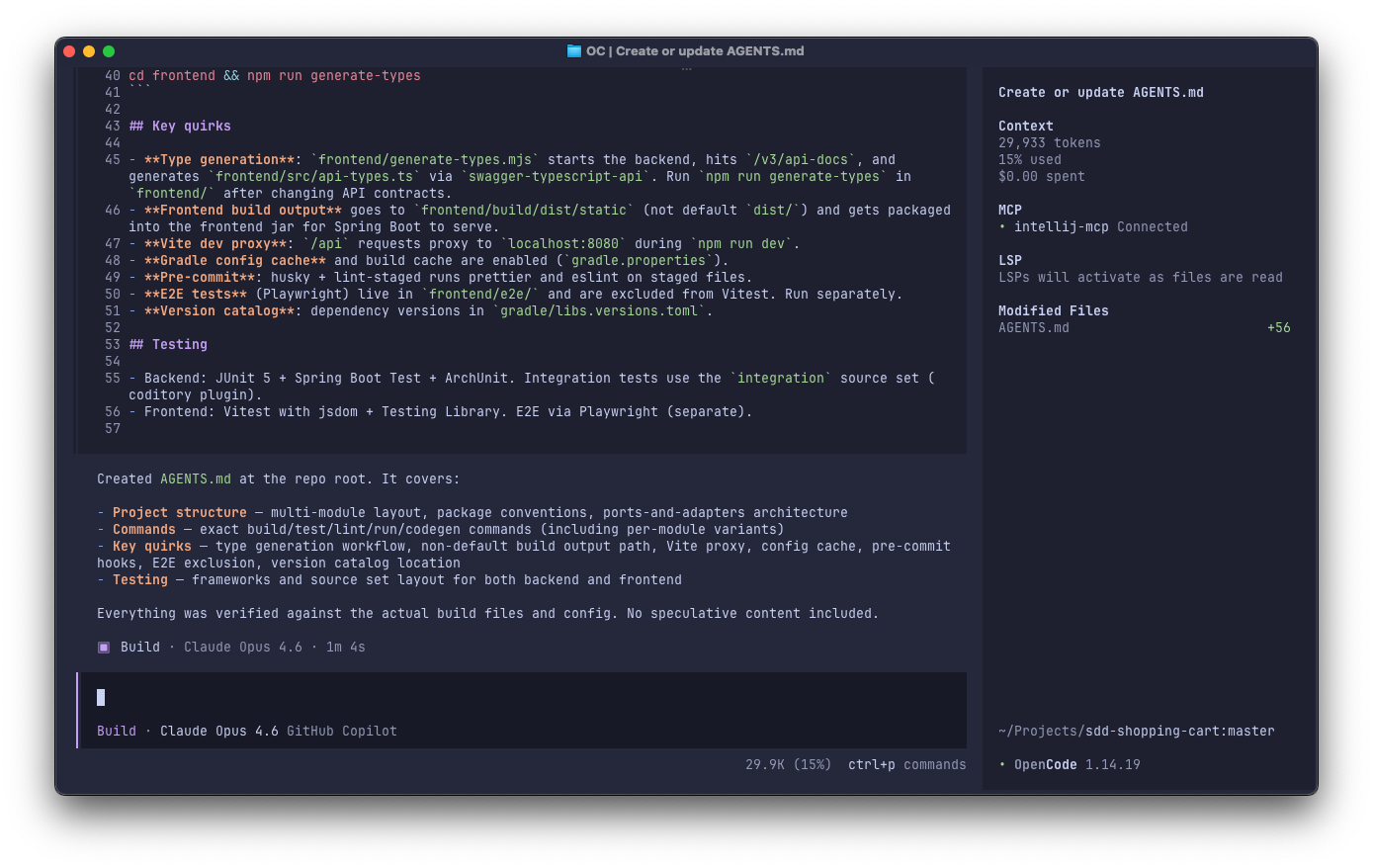 then, in a new, clean session:
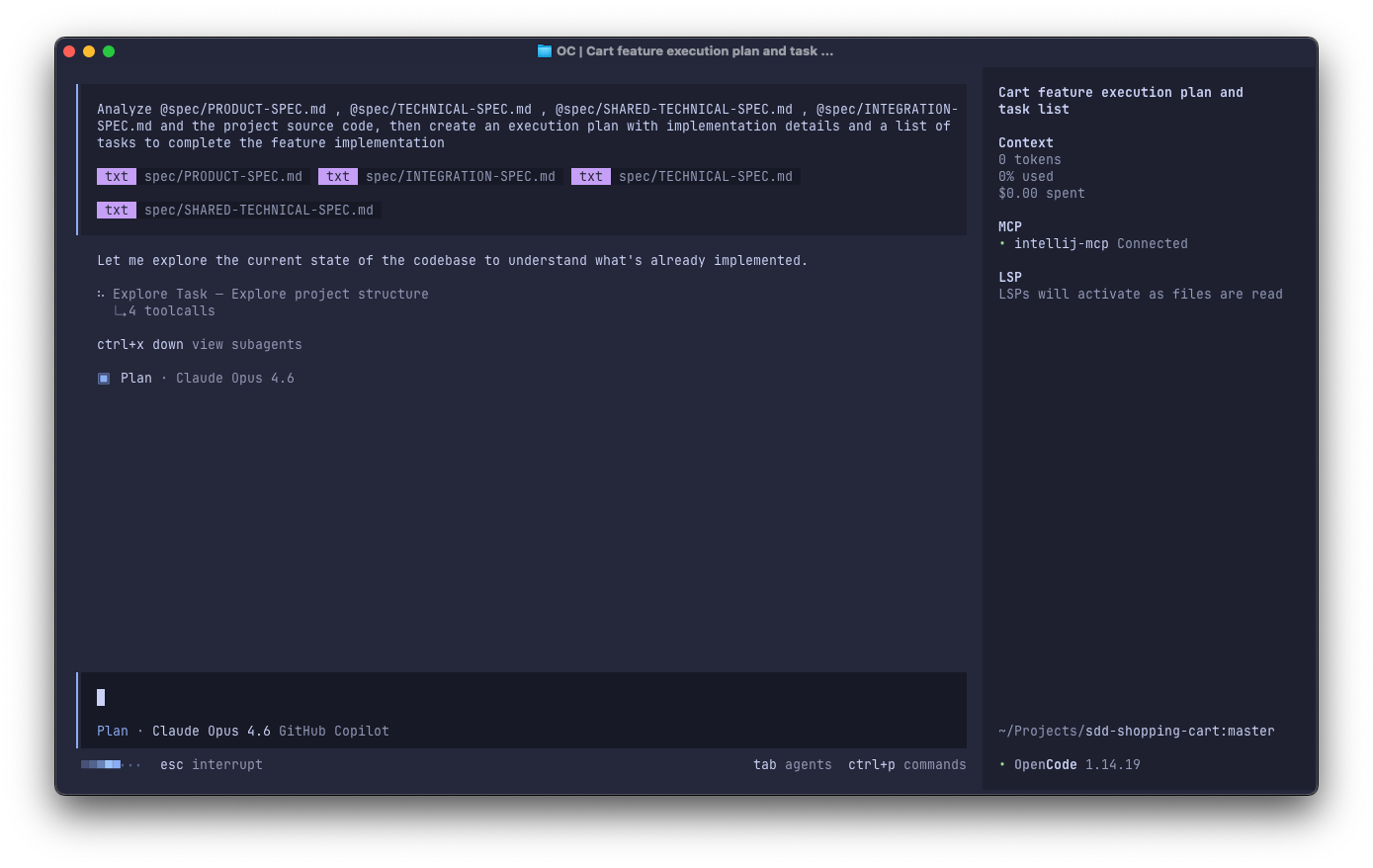 refine it a little:
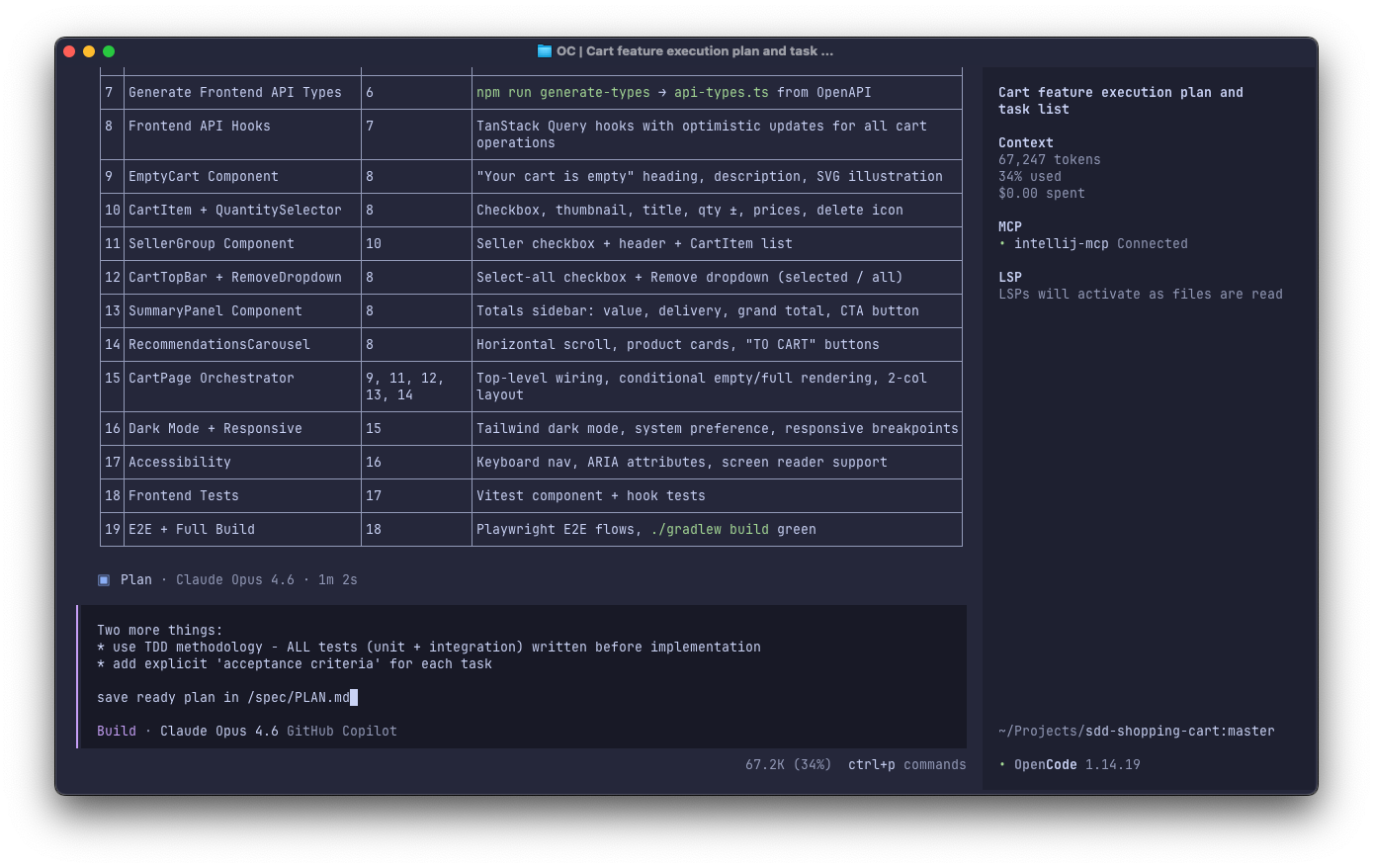 and we’ve got the very first version of
 PLAN.md, which we should review and refine for our needs:
# Execution Plan — Shopping Cart Feature (TDD)

### Conventions (from codebase)

- **Backend**: ports-and-adapters. Domain POJOs in `catalog.api`, JPA entities + impls in `catalog`, REST controller + DTOs in `catalog.web`. Configs package-private ending in `Configuration`. Facades (`*Commands`, `*Queries`) are public, everything else package-private.
- **Frontend**: wretch + TanStack Query with optimistic updates (`onMutate`/`onError`/`onSettled`).
- **Security**: `/api/**` requires auth. Local profile = form login (admin/password). Tests use `@WithMockUser`.
- **Currency**: integers in grosze (1 PLN = 100).

---

## Task 1: Write Tests — Seller & Product Entities + Seed Data

**Depends on:** —

**Description:**
Write integration tests that verify `Seller` and `Product` JPA entities persist correctly, enforce validation constraints, and that `data.sql` seed data loads as expected.

**Acceptance Criteria:**
- [ ] Integration test asserts `Seller` requires non-blank `name`
- [ ] Integration test asserts `Product` requires non-blank `title`, `priceInGrosze` > 0, non-null `sellerId`
- [ ] Integration test asserts unique constraint on `Product.id`
- [ ] Integration test asserts seed data contains at least 10 products across at least 3 sellers
- [ ] Integration test asserts `ProductRepository.findById()` and `SellerRepository.findById()` return seeded entities
- [ ] All tests compile but **fail** (no implementation yet)

---

## Task 2: Implement Seller & Product Entities + Seed Data

**Depends on:** Task 1

**Description:**
Create `PersistedSeller` and `PersistedProduct` JPA entities in `catalog` package, Spring Data repositories, domain POJOs in `catalog.api`, and `data.sql` with ~10 products across 3+ sellers (gym/fitness theme matching mockups).

**Acceptance Criteria:**
- [ ] `PersistedSeller` with `id` (UUID PK), `name` (varchar, not blank)
- [ ] `PersistedProduct` with `id` (UUID PK), `title`, `imageUrl`, `priceInGrosze` (long), `sellerId` (FK)
- [ ] `PersistedSellerRepository` and `PersistedProductRepository` (Spring Data JPA, package-private)
- [ ] Domain POJOs `Seller` and `Product` in `catalog.api`
- [ ] `data.sql` seeds at least 10 products across at least 3 sellers
- [ ] All tests from Task 1 **pass**
- [ ] ArchUnit tests pass

---

...

---

## Task 33: E2E Tests + Full Build Verification

**Depends on:** Task 32

**Description:**
Playwright E2E tests and full Gradle build.

**Acceptance Criteria:**

- [ ] E2E: empty cart → add from carousel → item appears → change qty → total updates → remove → empty cart
- [ ] E2E: select/deselect items → summary updates
- [ ] E2E: "Remove selected" and "Remove all" flows
- [ ] E2E: dark mode renders correctly
- [ ] `./gradlew build` passes
- [ ] `./gradlew :backend:test` passes
- [ ] `./gradlew :backend:integrationTest` passes
- [ ] `cd frontend && npm test` passes

---

## Parallelization Opportunities

| Group                    | Tasks               | After    |
|--------------------------|---------------------|----------|
| Backend mutation tests   | T5,T7,T8,T9,T10     | T4       |
| Recommendations          | T12→T13             | T2       |
| Frontend component tests | T18,T20,T24,T26,T28 | T17      |
| Frontend component impls | T19,T21,T25,T27,T29 | own test |
| SellerGroup              | T22→T23             | T21      |

---
Implement each task separately (Implement) #
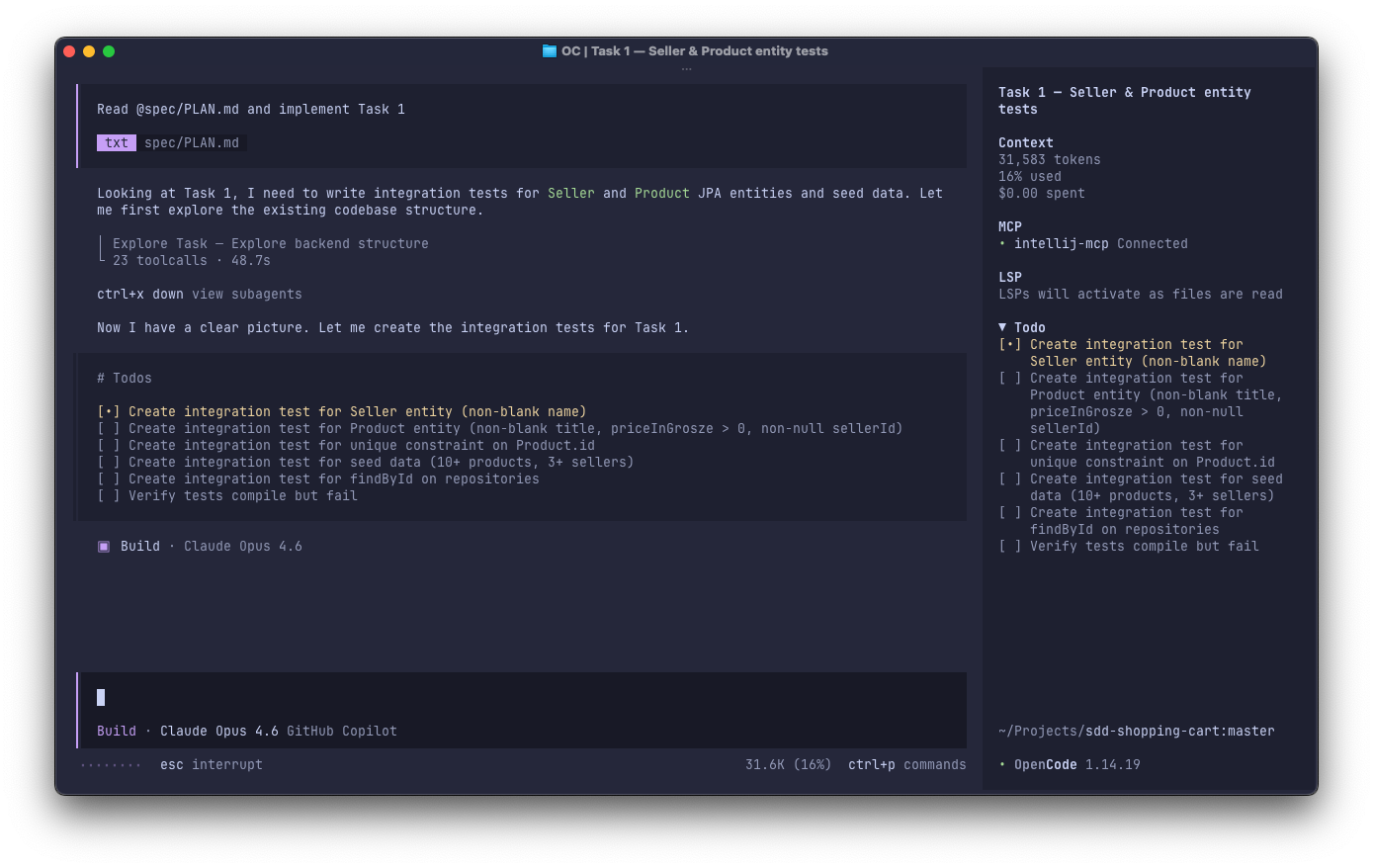
After accepting the plan, move on to implementation — delegate tasks to the coding agent one at a time. Point it to a specific task from the plan and let it work.
The agent, with access to the repository, will find the context needed for the task on its own. Even with a very short instruction (“implement task X”), the agent can analyze the code and find the right places for changes.
Important! During implementation, many decisions are made that aren’t precisely specified upfront. The specification should be updated as progress is
made. An agent reading the specification gains project context faster than if it had to analyze all the code.
Review the changes (Validate) #
Before creating a Pull Request, review the output. You are accountable for the code that goes to production — regardless of whether it was written by a human or an agent.
In the initial phase of working with agents, review will be slower and more detailed — that’s natural. To start working this way smoothly, in the beginning you can:
- work in small iterations
- ask the agent to generate small PRs
- do a full review of each PR
After reviewing the code yourself, you can also start a new, clean session and ask another agent to do the review — but remember: agent review is support, not a replacement. For critical elements — human review.
Tools #
“Fine, this all sounds reasonable — but doing it manually every single time? Specify, plan, implement, validate… Isn’t there something that automates the process?”
If you’re familiar with the SDD methodology, there are of course plenty of SDD implementations with predefined workflows and guardrails that can help you save time and produce better results, e.g.:
Pigeon Project #
At Allegro, we’re running the Pigeon Project, aimed at significantly accelerating software delivery while maintaining high quality and company standards.
One of its pillars is Specification-Driven Development — thanks to Paweł Kot, Łukasz Drumiński, Marcin Radoszewski, Michał Idzikowski and Jakub Kuzimski, we have our own internal SDD implementation.
For example, at the Implementation stage, I could use one of the tools Pigeon provides — the AlleManager orchestrator, a dedicated mode in OpenCode — to
execute the Plan simply by typing:
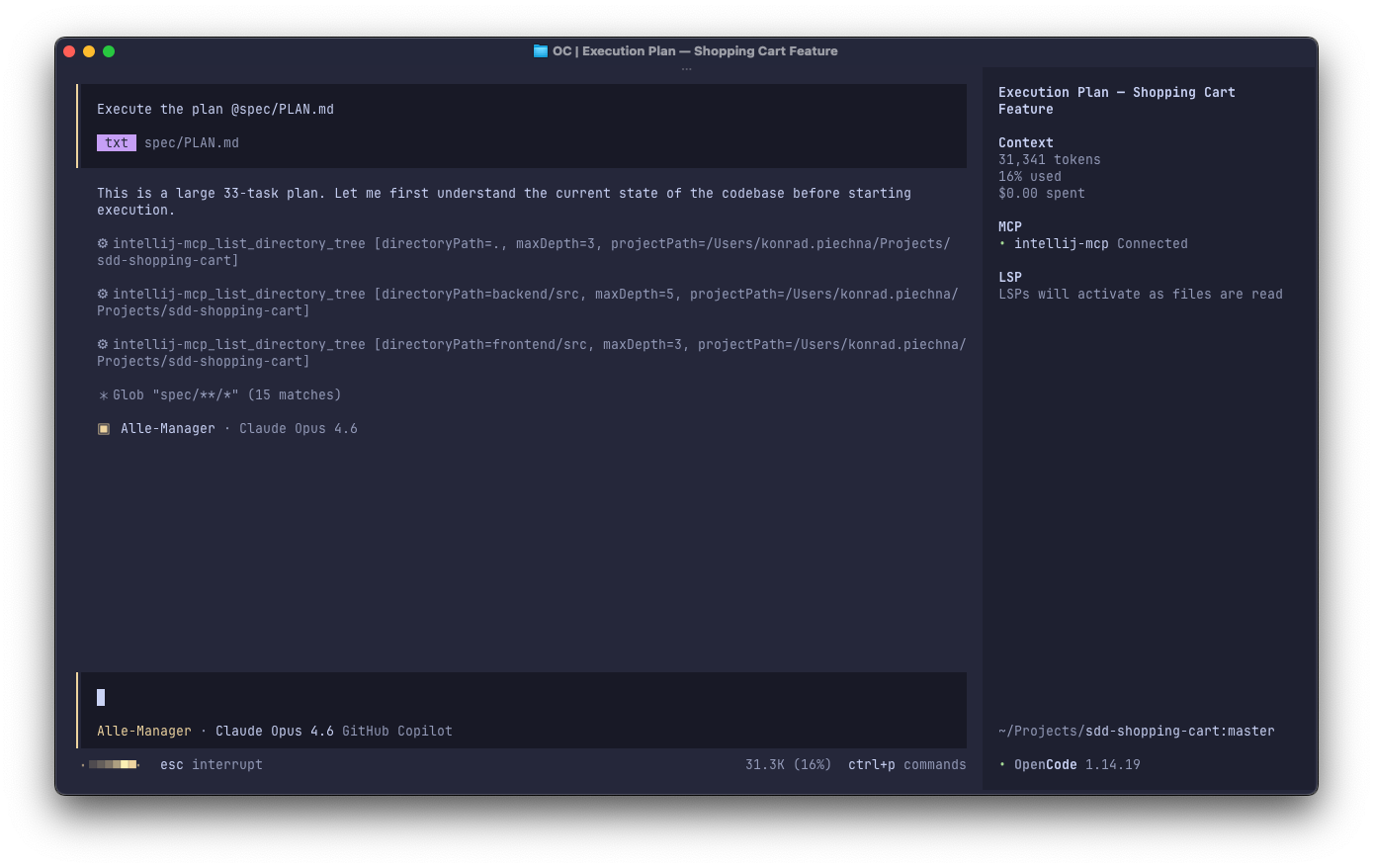
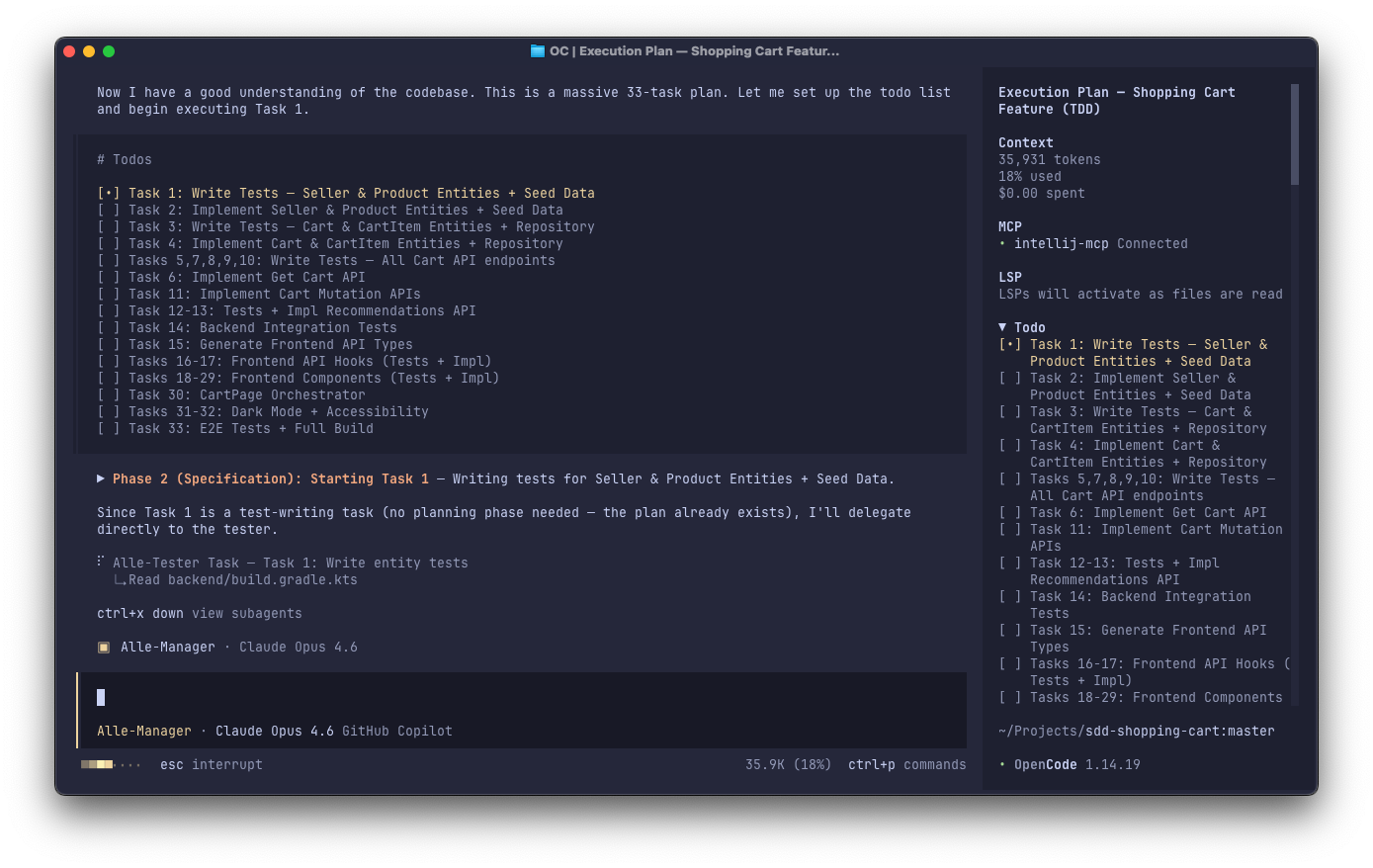 AlleManager executes the plan step by step. For each task, it delegates work in the following order:
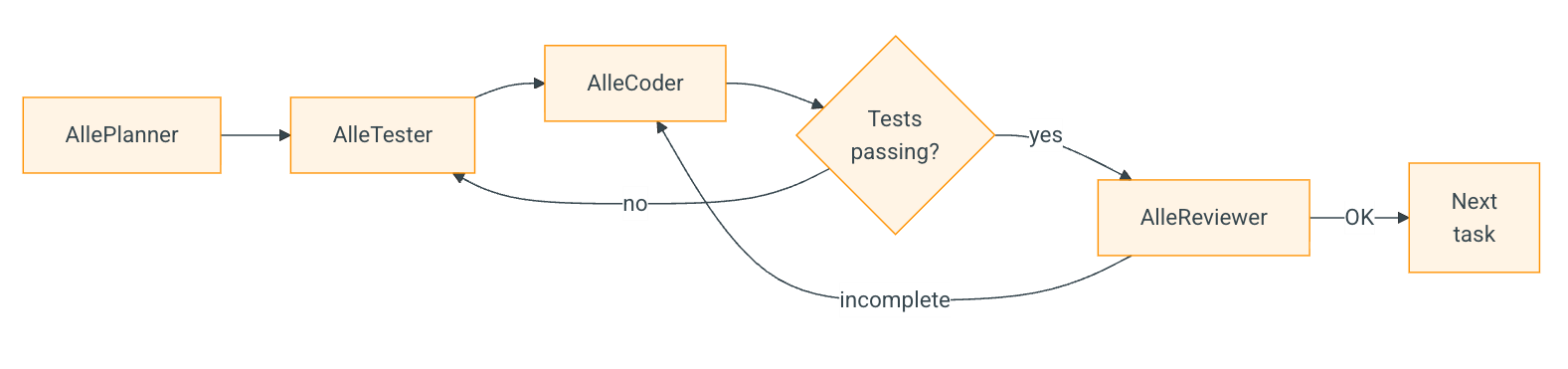 using specialized subagents:
| Subagent | Role |
|---|---|
| AlleManager | Orchestrator — delegates work, is read-only (doesn’t modify code) |
| AllePlanner | Prepares a detailed plan for a specific task |
| AlleTester | Writes tests for the feature (initially tests don’t pass — TDD) |
| AlleCoder | Implements the feature so that tests pass (separate frontend/backend variants) |
| AlleReviewer | Checks change completeness; if incomplete — back to AlleCoder |
| AlleSpecUpdater | Updates the specification after task implementation |
Summary #
I’m no expert — I’ve simply shared what I’ve heard, read, and experienced firsthand.
SDD is a methodology that evolves alongside AI, so best practices in SDD — and in working with LLMs and agents in general — are hard to pin down definitively. What works today may not necessarily work tomorrow.
A case in point: not long ago, prompt engineering was the hot topic, but now models are getting increasingly better at managing context and picking up the user’s intent from a plain prompt. We can achieve the same — or perhaps even better — results with a much simpler prompt, without the “you are a senior evangelist software engineer… ask me if you need me to clarify something… blah blah”.
I hope you’ve found something valuable here — I’d love to hear your thoughts and experiences on what works or doesn’t work for you when experimenting with SDD :)